Page 63 of 109
Re: RegExp Find & Replace 4.3 w/ 253 presets (2011-07-06) [M
Posted: Wed Apr 16, 2014 3:58 pm
by ZvezdanD
MMFrLife wrote:Might I suggest, and I understand that there might be limitations of which I'm not aware,
that you use the MM toolbar configure area to make presets friendlier/less daunting to sift through.
MM's Toolbar Configuration dialog box cannot be used in scripts, MM is lacking API functions for something like that.
Re: RegExp Find & Replace 4.3 w/ 253 presets (2011-07-06) [M
Posted: Wed Apr 16, 2014 6:32 pm
by MMFrLife
Yeah, I figured it was something with MM. Nonetheless, I seriously love this thing....and again, "Keep Up the Good Work"!!!
Issues with naming of Artists
Posted: Tue May 20, 2014 11:07 am
by mrbeezkneez
Some of my files have numbers in front of the artist field. How can I remove them. I tried the find and replace addon with no success. Here is what im looking at

Re: Issues with naming of Artists
Posted: Tue May 20, 2014 11:18 am
by mrbeezkneez
As I said I tried that with no luck :/
Re: RegExp Find & Replace 4.3 w/ 253 presets (2011-07-06) [M
Posted: Sat May 24, 2014 4:59 pm
by jpottsx1
I upgraded MM when I moved my install to a new machine. However I now have extra spaces in between my toolbar items that I added using the Regex F&R interface. I have cycled through each preset and cannot find any reason for the extra entries. The entries are just spaces without text or icon.
How can I reset the toolbar and reiadd my presets?
JEff
Re: RegExp Find & Replace 4.3 w/ 253 presets (2011-07-06) [M
Posted: Sat May 24, 2014 5:44 pm
by ZvezdanD
jpottsx1 wrote:How can I reset the toolbar and reiadd my presets?
RegExp presets in MM2 and MM3 are located on the Search toolbar, but in MM4 they are located on the separated RegExp toolbar. You could get the same configuration of toolbar buttons as before if you place RegExp toolbar next to the Search toolbar.
Re: RegExp Find & Replace 4.3 w/ 253 presets (2011-07-06) [M
Posted: Mon Jun 23, 2014 7:03 pm
by MMFrLife
How does the "shortcut" field work? Is this to set a hot key?
Re: RegExp Find & Replace 4.3 w/ 253 presets (2011-07-06) [M
Posted: Tue Jun 24, 2014 12:26 am
by ZvezdanD
MMFrLife wrote:How does the "shortcut" field work? Is this to set a hot key?
Here is the excerpt from the Usage section of the first post of this thread:
"The next control is the Shortcut text box which could be used to specify keyboard hotkey for the selected preset, for example Ctrl+T, which allows us to apply such preset to the selected tracks by the press on that hotkey."
Re: RegExp Find & Replace 4.3 w/ 253 presets (2011-07-06) [M
Posted: Tue Jun 24, 2014 1:10 am
by MMFrLife
That's what I figured. Thanks.
Is there some sort of preset search function? If not, would that be too difficult to implement?
I have the list of presets in text format and I've sectioned them out (with spacing) by function types, like add/remove/assign digits, add/remove/assign string to begin/end;
etc. However, they are still in the original order. I was thinking one could find the number from their text list, enter in a search field, and it would come right up.
....too difficult?
Would the numbers need to actually be in the preset drop down to work? I figure numbering them directly is problematic because every time you added a new preset the numbers would change. Is this thinking correct or am I way off?
......or is there already someway to do this or something similar?
Re: RegExp Find & Replace 4.3 w/ 253 presets (2011-07-06) [M
Posted: Tue Jun 24, 2014 8:12 am
by ZvezdanD
MMFrLife wrote:Is there some sort of preset search function? If not, would that be too difficult to implement?
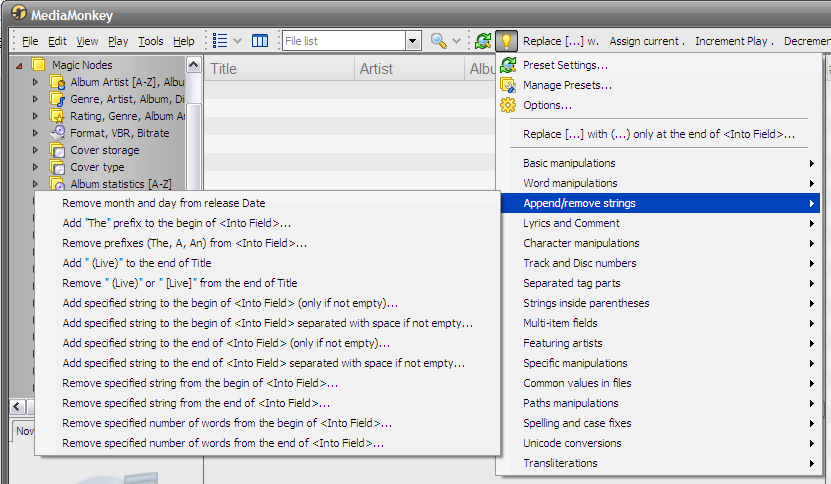
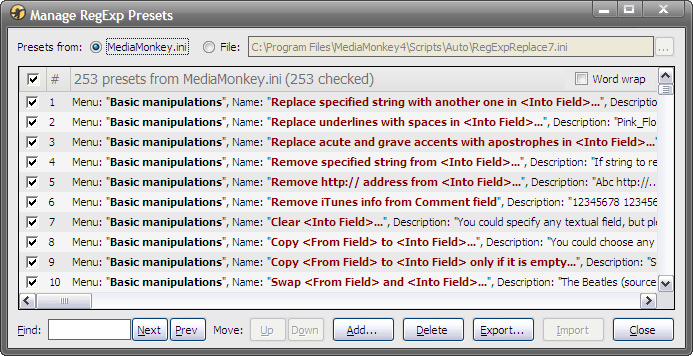
I have implemented that in the new version which should be ready very soon, but it will be available only to those who donated to me. It has also added a possibility to group presets into sub-menus and some another enhances.
Re: RegExp Find & Replace 4.3 w/ 253 presets (2011-07-06) [M
Posted: Tue Jun 24, 2014 8:25 am
by MMFrLife
That sounds and looks pretty sweet! Hard to tell though, without getting into it and testing it out. I will be donating as soon as that hits!!
Re: RegExp Find & Replace 4.3 w/ 253 presets (2011-07-06) [M
Posted: Tue Jun 24, 2014 9:18 am
by dtsig
ZvezdanD wrote:MMFrLife wrote:Is there some sort of preset search function? If not, would that be too difficult to implement?
I have implemented that in the new version which should be ready very soon, but it will be available only to those who donated to me. It has also added a possibility to group presets into sub-menus and some another enhances.
Would it be possible for you to email those of us who have donated for one of your tools, to let us know when you are adding features to any of your tools that are donate only. That way we will know about it (really hard to read all the bits here and other forums).
Look forward to these added features
Re: RegExp Find & Replace 4.3 w/ 253 presets (2011-07-06) [M
Posted: Tue Jun 24, 2014 9:38 am
by ZvezdanD
dtsig wrote:Would it be possible for you to email those of us who have donated for one of your tools, to let us know when you are adding features to any of your tools that are donate only.
Yes, of course. I will send you the new version as soon as it is ready.
Re: RegExp Find & Replace 4.3 w/ 253 presets (2011-07-06) [M
Posted: Tue Jun 24, 2014 4:55 pm
by dtsig
Thanks man ... really great tools
Re: RegExp Find & Replace 4.3 w/ 253 presets (2011-07-06) [M
Posted: Sun Sep 28, 2014 1:19 am
by onefreeborn
Can't install on Win 8.1 with MM v4.1.4.1709
Can't install. Just get following error:
Cannot create file c:\programdata\mediamonkey\extensions\regexpreplace\uninstall.vbs
However, this file, in this location does indeed already exist. Furthermore, the extension is listed in the extensions list within MM as v4.3 with no update available.
But, under the MM Edit menu there is no entry for editing Tags (in other words, no menu entry called "RegExp Find and Replace".)
Furthermore, I can't uninstall the extension either:
Error #70 - Microsoft VBScript runtime error
Permission denied
File: "C:\ProgramData\MediaMonkey\Extensions\RegExpReplace\Uninstall.vbs", Line: 53, Column: 4
[ OK ]
I am logged in as an Administrator on the machine.
Any help would be greatly appreciated. I use this extension on another computer and find it helpful.
-------------------------
UPDATE... I figured out my problem.. You must run MediaMonkey in Administrative mode to install this extension (and probably others too) so just right-click on the MediaMonkey shortcut and select "Run as Administrator" before installing/configuring this extension. Thereafter, you don't need to run it in Administrator mode to use it.
However, if you want to update your extensions at a later time you must be running MM as Administrator mode to do so. So... it may be helpful to just set MM to always "Run as Administrator" so you won't have the problem I did above. To do so, just right-click the MM shortcut, click Properties, select the Compatibility tab, and check the box for "Run this program as an administrator".
Although I solved the problem myself, I'm leaving this post so that Google can index the error messages above and hopefully benefit some other person that may have this problem.
Thanks for a great extension!