Page 1 of 2
Application Error with Build 3184
Posted: Sun Dec 28, 2025 8:30 pm
by Riegelstriegel
Hi, I just got an application error with build 3184. It wasn't the first crash with this build for me, but now I was able to take a screenshot from the error message.
I tabbed back into MM after listening to some music and clicked on a Playlist in the media tree. Then MM crashed, although Music was still playing in the background.
I hope it helps. I don't have any further logs because I didn't have the debug version installed..
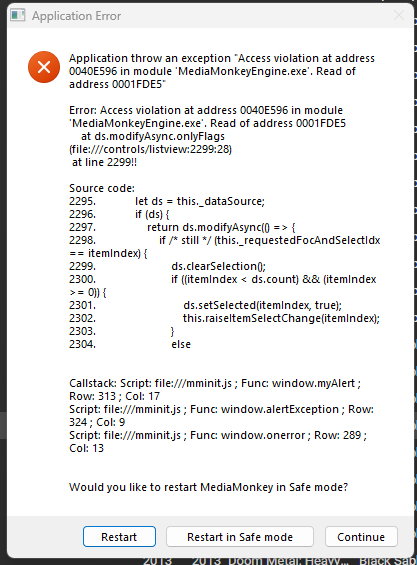
Re: Application Error with Build 3184
Posted: Sun Dec 28, 2025 10:50 pm
by Lowlander
Is this reproducible?
Re: Application Error with Build 3184
Posted: Wed Dec 31, 2025 7:12 am
by Riegelstriegel
Unfortunately not. Otherwise I would have captured a proper debug log for you. I was hoping that the message still gives you an idea what has happened there.
I had a few crashes with this build but they seemed random and maybe not related to each other.
The funniest crash occurred when the library panel was somehow stuck scrolling down. I don't know how I managed to do that, but nothing could fix this state. After a few seconds MM crashed.
Re: Application Error with Build 3184
Posted: Wed Dec 31, 2025 10:02 am
by hapeba
Here the same. But to short for a screenshot.
Play music or play video, add or remove or scan new ... and when i close MM then there is a access violation.
Re: Application Error with Build 3184
Posted: Thu Jan 01, 2026 6:38 pm
by Peke
Hi,
hapeba wrote: ↑Wed Dec 31, 2025 10:02 am
Here the same. But to short for a screenshot.
Play music or play video, add or remove or scan new ... and when i close MM then there is a access violation.
Please use Debug Version of MM if it gets repeated, that way you can send us log files and we can se ewhere exactly it crashes.
Re: Application Error with Build 3184
Posted: Fri Jan 02, 2026 3:51 am
by hapeba
Now with debug version there are no errors.
But what i must do ... settings for debug and where are the logfiles?
Re: Application Error with Build 3184
Posted: Fri Jan 02, 2026 8:48 am
by Peke
hapeba wrote: ↑Fri Jan 02, 2026 3:51 am
Now with debug version there are no errors.
But what i must do ... settings for debug and where are the logfiles?
All is explained at
https://www.mediamonkey.com/forum/viewtopic.php?t=86643
Re: Application Error with Build 3184
Posted: Fri Jan 02, 2026 10:16 am
by Lowlander
So, no issues with the debug version? Did you install it on top of the normal version?
If so, does installing the regular version on top have the errors return again?
Re: Application Error with Build 3184
Posted: Fri Jan 02, 2026 2:33 pm
by hapeba
I install the debug version in top of the normal version.
I test the normal version install in top of the debug version next week.
Re: Application Error with Build 3184
Posted: Sat Jan 03, 2026 10:23 am
by hapeba
I install normal version over debug version and the errors are back.
Re: Application Error with Build 3184
Posted: Sat Jan 03, 2026 10:31 am
by Peke
hapeba wrote: ↑Sat Jan 03, 2026 10:23 am
I install normal version over debug version and the errors are back.
What do you have installed of MM5 addons? Can you confirm it also happens in Clean Portable install?
Maybe also you can ZIP MM settings folder along MM5.DB, maybe there is something in your setup that triggers it with combination of installed addons/skins.
Re: Application Error with Build 3184
Posted: Sat Jan 03, 2026 10:39 am
by hapeba
I have installed only the standard and one addon "MediaMonkey codec pack 3.0.12"
Re: Application Error with Build 3184
Posted: Sun Jan 04, 2026 6:56 pm
by Peke
hapeba wrote: ↑Sat Jan 03, 2026 10:39 am
I have installed only the standard and one addon "MediaMonkey codec pack 3.0.12"
Hmmmm, Still can't replicate

Re: Application Error with Build 3184
Posted: Mon Jan 05, 2026 4:14 am
by hapeba
Now i installed 3200 normal portable. --> No errors
Next i deinstall all and delete all from MM and install 3200 normal.
Re: Application Error with Build 3184
Posted: Mon Jan 05, 2026 10:30 am
by Ludek
Hi,
I think I know why the exception happened, will be fixed in the next build 3201.
Thanks for reporting!