Scanning folders it has not been told to: 2027.0.0.3514

Post a reply

Smilies
:D :) :( :o :-? 8) :lol: :x :P :oops: :cry: :evil: :roll: :wink:

BBCode is ON
[img] is ON
[url] is ON
Smilies are ON

Topic review
   

Expand view Topic review: Scanning folders it has not been told to: 2027.0.0.3514

Re: Scanning folders it has not been told to: 2027.0.0.3514

by Peke » Thu Aug 13, 2026 3:02 pm

gregorywest wrote: Thu Aug 13, 2026 11:19 am I can wait for the next release. I have about 90K of mp3, in about 1,000 folders. No point in rushing, as MMW will only get mixed up again as I clean up the files. But truely like to thank you for the suggestion.

Greg
Great, it should be fixed in next build and you should normally rescan without duplicates.

Re: Scanning folders it has not been told to: 2027.0.0.3514

by gregorywest » Thu Aug 13, 2026 11:19 am

I can wait for the next release. I have about 90K of mp3, in about 1,000 folders. No point in rushing, as MMW will only get mixed up again as I clean up the files. But truely like to thank you for the suggestion.

Greg

Re: Scanning folders it has not been told to: 2027.0.0.3514

by Peke » Wed Aug 12, 2026 4:40 pm

gregorywest wrote: Tue Aug 11, 2026 9:58 am If there a rough ETA on when 2027.0.0.3517 going to be available? ie. Should I just wait for it, or carry on loading my database?

Greg
You can wait or use suggestions I wrote at:
Peke wrote: Thu Aug 06, 2026 7:29 pm try:
1. Unmap Z:
2. Restore your old DB
3. Select all tracks from Z: (NOTE: In MM Entire library -> Location will not have Drive name now)
4. Use File -> Locate Missing/Moved option
5. Select "\\ds1019\" Folder with files -> OK (You can copy/paste location from Explorer)
6. It should find them and all should be OK now

Re: Scanning folders it has not been told to: 2027.0.0.3514

by gregorywest » Tue Aug 11, 2026 9:58 am

If there a rough ETA on when 2027.0.0.3517 going to be available? ie. Should I just wait for it, or carry on loading my database?

Greg

Re: Scanning folders it has not been told to: 2027.0.0.3514

by Peke » Mon Aug 10, 2026 3:28 pm

Hi,
If you have not made LOG file you should wait as we re made several improvements for next beta see https://www.ventismedia.com/mantis/view.php?id=22266

Re: Scanning folders it has not been told to: 2027.0.0.3514

by Lowlander » Sun Aug 09, 2026 9:44 am

Attach the log to a Support Ticket.

Re: Scanning folders it has not been told to: 2027.0.0.3514

by gregorywest » Sun Aug 09, 2026 8:55 am

not yet, but can do. never done logging in MMW so give me a couple hours and I will attack a log file.
Should I put the log in a message, or send a zip file somewhere?
Greg

Re: Scanning folders it has not been told to: 2027.0.0.3514

by Peke » Sat Aug 08, 2026 7:00 pm

Hi,
Have you created any LOG files and attached to support ticket so that we can analyze?

Re: Scanning folders it has not been told to: 2027.0.0.3514

by gregorywest » Sat Aug 08, 2026 10:21 am

OK this is going from bad to much much much worse.
I have a folder [M: | \\10.10.10.74\Media]\Music
I get stuff ready for importing into MMW in a folder on drive D:
I think import the music files using Tools -> Organize Files. When I do this I now have three (3) places where the same files are being displayed. To make matters worse, each area is showing a different subset of the total files. This is beyond confusing what is happening and what I should be doing to make this work right.

Image
Greg

Re: Scanning folders it has not been told to: 2027.0.0.3514

by shduff » Fri Aug 07, 2026 11:58 am

Followed the steps provided and have now moved all files to path: \\ds1019 per the recommended method.

Thanks for the assistance on this!

Re: Scanning folders it has not been told to: 2027.0.0.3514

by shduff » Thu Aug 06, 2026 7:35 pm

Ok will give this a try when I can.

Thanks to all!

Re: Add/Recan files adding UNC Path to All Music Files

by Peke » Thu Aug 06, 2026 7:29 pm

shduff wrote: Thu Aug 06, 2026 2:15 pm Hello All!

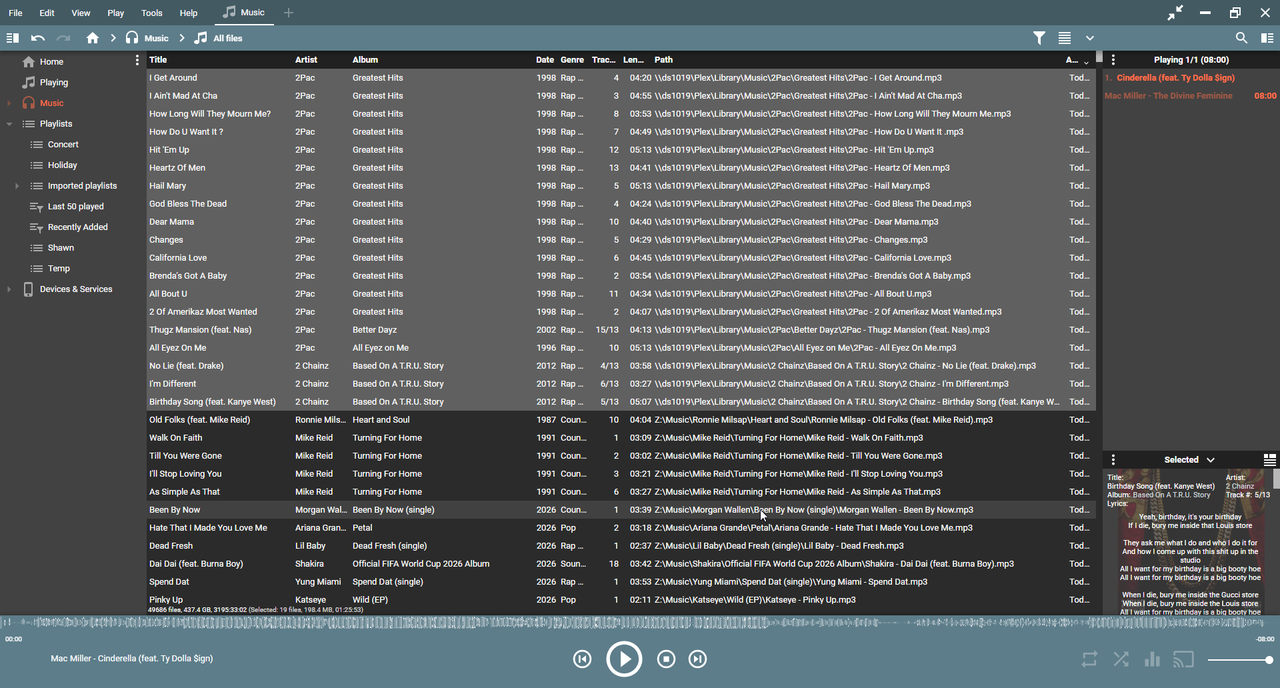
I have my music library on a Synology mapped as Z:. My library is then configured to scan Z:\Music. After upgrading to 2027 (currently 2027.0.0.3516), when the scan is set to either start-up or Scan Now is selected, the scan starts adding files using the UNC Path (\\ds1019) to the all files list. I have to select cancel and then remove from the DB.
Image

This worked previously on 2024. Searched the forum and didn't really find anything related (unless I missed).

Appreciate any assistance on this!
I can't replicate steps you describe on my QNAP, but it is possible that it is an regression of feature described at https://www.ventismedia.com/mantis/view.php?id=5548

After you create LOG file here is what you can try:
1. Unmap Z:
2. Restore your old DB
3. Select all tracks from Z: (NOTE: In MM Entire library -> Location will not have Drive name now)
4. Use File -> Locate Missing/Moved option
5. Select "\\ds1019\" Folder with files -> OK (You can copy/paste location from Explorer)
6. It should find them and all should be OK now

HINT: Mapped Drive letters are known to fail while making tracks unplayable so we recognize Mapped Drives and use original UNC Path source during rescan. I've added https://www.ventismedia.com/mantis/view.php?id=22266 if I am right and your LOG file should confirm it.

Re: Scanning folders it has not been told to: 2027.0.0.3514

by Lowlander » Thu Aug 06, 2026 6:19 pm

I've not seen this.

Can you please capture this in a debug log (step 4b) and attach the log to a Support Ticket: viewtopic.php?t=86643

Re: Scanning folders it has not been told to: 2027.0.0.3514

by shduff » Thu Aug 06, 2026 6:03 pm

All of my playlists already existed and all songs within point to Z:\Music!

Re: Scanning folders it has not been told to: 2027.0.0.3514

by Lowlander » Thu Aug 06, 2026 2:27 pm

Lowlander wrote: Thu Aug 06, 2026 12:38 pm Do you have Playlists pointing there? This is normally the reason files outsides the selected folders are scanned.

Top