I am rebuilding my database. First I cleared the database then I put in the search folders:
D:\music-area\folder1
D:\music-area\folder2
D:\music-area\folder4
M:\Music
I can see on the status bar MMW is scanning //10.10.10.222/.... This is infact the IP for M:\Music. Why do I get an entry under [Network] as well as an entry for M:\?
Not sure if this is the same issue: After a while (15+ minutes) MMW gets a completely white screen and I have to kill it in the task manager.
Any help would be great
Scanning folders it has not been told to: 2027.0.0.3514
Moderator: Gurus
-
gregorywest
- Posts: 51
- Joined: Sat Aug 18, 2018 11:46 am
Re: Scanning folders it has not been told to: 2027.0.0.3514
Do you have Playlists pointing there? This is normally the reason files outsides the selected folders are scanned.
Please update to the latest 2027 build to see if the white screen issue has been solved.
Please update to the latest 2027 build to see if the white screen issue has been solved.
Download MediaMonkey ♪ License ♪ Knowledge Base ♪ MediaMonkey for Windows 2024 Help ♪ MediaMonkey for Android Help
Lowlander (MediaMonkey user since 2003)
Lowlander (MediaMonkey user since 2003)
-
gregorywest
- Posts: 51
- Joined: Sat Aug 18, 2018 11:46 am
Re: Scanning folders it has not been told to: 2027.0.0.3514
Nothing under playlists. I did find a reference under Folders. I have deleted that, hopefully this will work.
Nope did not work. Under Folders-Network I am seeing all the shares on //10.10.10.222 Only one of the shares has files I want. Do not want any files that are on the other shares/nas.
Greg
Nope did not work. Under Folders-Network I am seeing all the shares on //10.10.10.222 Only one of the shares has files I want. Do not want any files that are on the other shares/nas.
Greg
Re: Scanning folders it has not been told to: 2027.0.0.3514
Folders shows all drives & network shares, folders, and compatible media files on PC, not just what's in the MediaMonkey Library.
Download MediaMonkey ♪ License ♪ Knowledge Base ♪ MediaMonkey for Windows 2024 Help ♪ MediaMonkey for Android Help
Lowlander (MediaMonkey user since 2003)
Lowlander (MediaMonkey user since 2003)
Add/Recan files adding UNC Path to All Music Files
Hello All!
I have my music library on a Synology mapped as Z:. My library is then configured to scan Z:\Music. After upgrading to 2027 (currently 2027.0.0.3516), when the scan is set to either start-up or Scan Now is selected, the scan starts adding files using the UNC Path (\\ds1019) to the all files list. I have to select cancel and then remove from the DB.
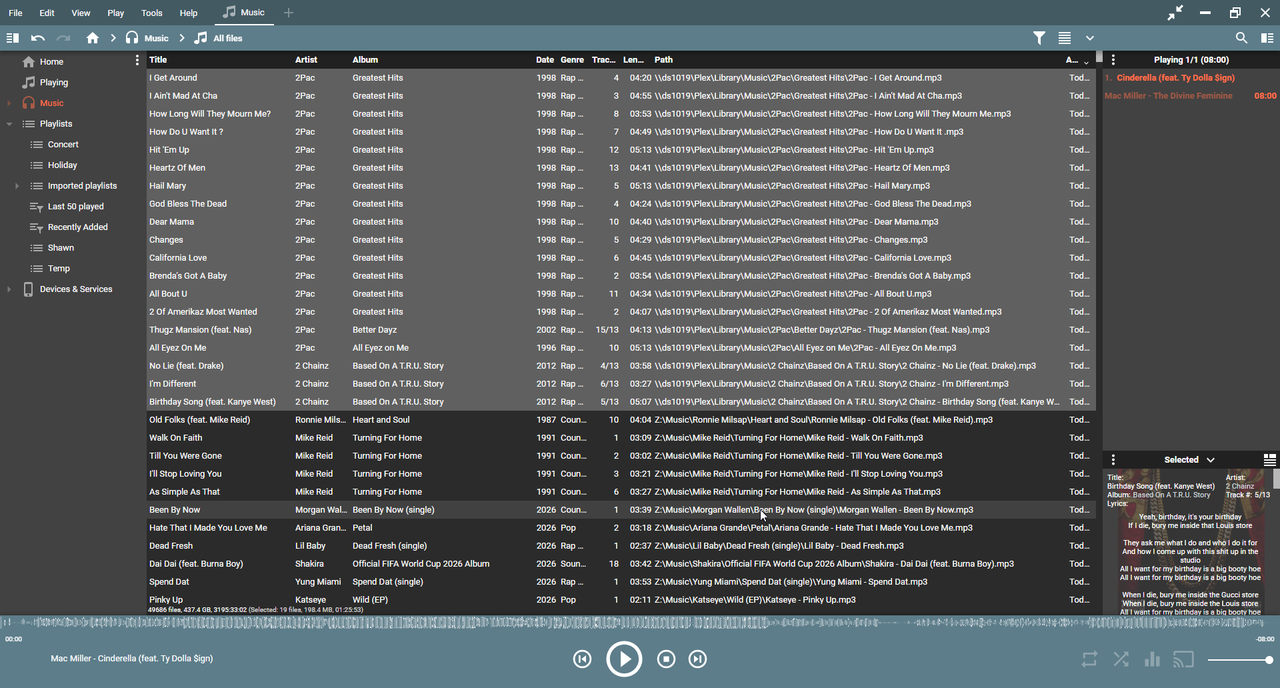
This worked previously on 2024. Searched the forum and didn't really find anything related (unless I missed).
Appreciate any assistance on this!
I have my music library on a Synology mapped as Z:. My library is then configured to scan Z:\Music. After upgrading to 2027 (currently 2027.0.0.3516), when the scan is set to either start-up or Scan Now is selected, the scan starts adding files using the UNC Path (\\ds1019) to the all files list. I have to select cancel and then remove from the DB.
This worked previously on 2024. Searched the forum and didn't really find anything related (unless I missed).
Appreciate any assistance on this!
Re: Scanning folders it has not been told to: 2027.0.0.3514
Download MediaMonkey ♪ License ♪ Knowledge Base ♪ MediaMonkey for Windows 2024 Help ♪ MediaMonkey for Android Help
Lowlander (MediaMonkey user since 2003)
Lowlander (MediaMonkey user since 2003)
Re: Scanning folders it has not been told to: 2027.0.0.3514
All of my playlists already existed and all songs within point to Z:\Music!
Re: Scanning folders it has not been told to: 2027.0.0.3514
I've not seen this.
Can you please capture this in a debug log (step 4b) and attach the log to a Support Ticket: viewtopic.php?t=86643
Can you please capture this in a debug log (step 4b) and attach the log to a Support Ticket: viewtopic.php?t=86643
Download MediaMonkey ♪ License ♪ Knowledge Base ♪ MediaMonkey for Windows 2024 Help ♪ MediaMonkey for Android Help
Lowlander (MediaMonkey user since 2003)
Lowlander (MediaMonkey user since 2003)
Re: Add/Recan files adding UNC Path to All Music Files
I can't replicate steps you describe on my QNAP, but it is possible that it is an regression of feature described at https://www.ventismedia.com/mantis/view.php?id=5548shduff wrote: ↑Thu Aug 06, 2026 2:15 pm Hello All!
I have my music library on a Synology mapped as Z:. My library is then configured to scan Z:\Music. After upgrading to 2027 (currently 2027.0.0.3516), when the scan is set to either start-up or Scan Now is selected, the scan starts adding files using the UNC Path (\\ds1019) to the all files list. I have to select cancel and then remove from the DB.
This worked previously on 2024. Searched the forum and didn't really find anything related (unless I missed).
Appreciate any assistance on this!
After you create LOG file here is what you can try:
1. Unmap Z:
2. Restore your old DB
3. Select all tracks from Z: (NOTE: In MM Entire library -> Location will not have Drive name now)
4. Use File -> Locate Missing/Moved option
5. Select "\\ds1019\" Folder with files -> OK (You can copy/paste location from Explorer)
6. It should find them and all should be OK now
HINT: Mapped Drive letters are known to fail while making tracks unplayable so we recognize Mapped Drives and use original UNC Path source during rescan. I've added https://www.ventismedia.com/mantis/view.php?id=22266 if I am right and your LOG file should confirm it.
Best regards,
Peke
MediaMonkey Team lead QA/Tech Support guru
Admin of Free MediaMonkey addon Site HappyMonkeying



How to attach PICTURE/SCREENSHOTS to forum posts
Peke
MediaMonkey Team lead QA/Tech Support guru
Admin of Free MediaMonkey addon Site HappyMonkeying
How to attach PICTURE/SCREENSHOTS to forum posts
Re: Scanning folders it has not been told to: 2027.0.0.3514
Ok will give this a try when I can.
Thanks to all!
Thanks to all!
Re: Scanning folders it has not been told to: 2027.0.0.3514
Followed the steps provided and have now moved all files to path: \\ds1019 per the recommended method.
Thanks for the assistance on this!
Thanks for the assistance on this!
-
gregorywest
- Posts: 51
- Joined: Sat Aug 18, 2018 11:46 am
Re: Scanning folders it has not been told to: 2027.0.0.3514
OK this is going from bad to much much much worse.
I have a folder [M: | \\10.10.10.74\Media]\Music
I get stuff ready for importing into MMW in a folder on drive D:
I think import the music files using Tools -> Organize Files. When I do this I now have three (3) places where the same files are being displayed. To make matters worse, each area is showing a different subset of the total files. This is beyond confusing what is happening and what I should be doing to make this work right.
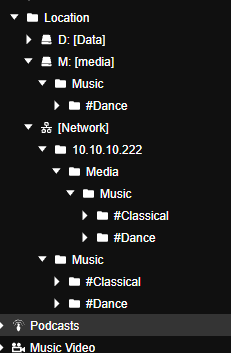
Greg
I have a folder [M: | \\10.10.10.74\Media]\Music
I get stuff ready for importing into MMW in a folder on drive D:
I think import the music files using Tools -> Organize Files. When I do this I now have three (3) places where the same files are being displayed. To make matters worse, each area is showing a different subset of the total files. This is beyond confusing what is happening and what I should be doing to make this work right.
Greg
Re: Scanning folders it has not been told to: 2027.0.0.3514
Hi,
Have you created any LOG files and attached to support ticket so that we can analyze?
Have you created any LOG files and attached to support ticket so that we can analyze?
Best regards,
Peke
MediaMonkey Team lead QA/Tech Support guru
Admin of Free MediaMonkey addon Site HappyMonkeying
How to attach PICTURE/SCREENSHOTS to forum posts
Peke
MediaMonkey Team lead QA/Tech Support guru
Admin of Free MediaMonkey addon Site HappyMonkeying
How to attach PICTURE/SCREENSHOTS to forum posts
-
gregorywest
- Posts: 51
- Joined: Sat Aug 18, 2018 11:46 am
Re: Scanning folders it has not been told to: 2027.0.0.3514
not yet, but can do. never done logging in MMW so give me a couple hours and I will attack a log file.
Should I put the log in a message, or send a zip file somewhere?
Greg
Should I put the log in a message, or send a zip file somewhere?
Greg
Re: Scanning folders it has not been told to: 2027.0.0.3514
Attach the log to a Support Ticket.
Download MediaMonkey ♪ License ♪ Knowledge Base ♪ MediaMonkey for Windows 2024 Help ♪ MediaMonkey for Android Help
Lowlander (MediaMonkey user since 2003)
Lowlander (MediaMonkey user since 2003)