
MediaMonkey 2024.0.0.3040
I started using Auto-Tag feature recently. Been a great tool so far. Especially for inconstant capitalization, misspellings, and removing unnecessary information from track title.
Auto-Tag is also great for updating my album art, but I have found this to be a multi-step process, and here is why. Auto-Tag will falsely tell you that your album art is a max of 500x500 (or 500 by some number that is proportional to the actual value). When clicking on the album art, it will display it at the lower resolution (i.e. 500x500) and not render it to its actual quality. I find that before I choose the new album art, I need to inspect the original first in “Properties” -> “Artwork”.
Here is an example, same album, only tagged with a single image in Auto-Tag.
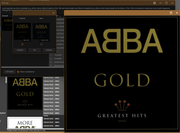
Notice the max resolution of 500x500 and the render done at the lower resolution. Now let’s look at “Properties”:
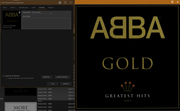
Notice that the album art is quite a bit larger than 500x500. Also notice that the render is much higher quality (much sharper edges on lettering).
Thus, the multi-step process to replace album-art.


