Hello,
I have what some would consider a large collection (449K MP3 files). I've already configured MS Defender to exclude the MM database folder from scans, but curious what other configuration options are recommended to help speed up the listbox display, which appears to reconstitute itself in different size "chunks" to refresh. I have MM using the List+Column Filter mode (i.e. Apple iTunes clone).
v/r,
Scott
Very large collections and MM speed
Moderator: Gurus
Re: Very large collections and MM speed
Speed of the drive the database file is stored on makes a difference.
Download MediaMonkey ♪ License ♪ Knowledge Base ♪ MediaMonkey for Windows 2024 Help ♪ MediaMonkey for Android Help
Lowlander (MediaMonkey user since 2003)
Lowlander (MediaMonkey user since 2003)
Re: Very large collections and MM speed
Agreed. MM and all of its associated files are stored on a SSD
Re: Very large collections and MM speed
Hi,
Few things you should check:
- Try to disable column filter and compare speed?
- Make sure no background MM tasks are active.
- You can filter collections or even try to use Entire library Collection
Asking because I have half of your library and all behavior is almost instantaneous (especially on latest MM 2024.2.0.3178) and my files are on NAS (accessed thru wired connection), but MM5.DB is on Samsung 990 Pro M.2 SSD which makes library query and access as fast as possible.
Few things you should check:
- Try to disable column filter and compare speed?
- Make sure no background MM tasks are active.
- You can filter collections or even try to use Entire library Collection
Asking because I have half of your library and all behavior is almost instantaneous (especially on latest MM 2024.2.0.3178) and my files are on NAS (accessed thru wired connection), but MM5.DB is on Samsung 990 Pro M.2 SSD which makes library query and access as fast as possible.
Best regards,
Peke
MediaMonkey Team lead QA/Tech Support guru
Admin of Free MediaMonkey addon Site HappyMonkeying



How to attach PICTURE/SCREENSHOTS to forum posts
Peke
MediaMonkey Team lead QA/Tech Support guru
Admin of Free MediaMonkey addon Site HappyMonkeying
How to attach PICTURE/SCREENSHOTS to forum posts
Re: Very large collections and MM speed
[note: my previous reply was mangled by Notepad; below is the correct reply. I couldn't edit the previous post to correct the mistake]
Hi Peke,
Thank you for your reply. Here are my replies to your queries:
1. I've not disabled the Column Filter feature, as I won't use a MP3 collection manager that lacks that functionality (e.g. Helium). For me, it is the most logical means of drilling down into a collection (especially one as large as mine).
2. No other MM fragments are floating in Task Manager
To better define my "speed" question - when the primary grid control which lists the individual MP3 songs is forced to redraw the entire collection, after the first database read it then picks up steam to then grab batches of 100,000 records to populate the grid. After the grid is fully populated, the three filter grids (Genre, Artist, Album is how mine is configured) are then displayed from left to right above the list of MP3 files. The bottom grid control takes about 6 seconds to display, then the top three grid controls then appear from left to right; first the genre, about .5 second wait, then the artist, another .5 second wait, then the album grid.
An open source MP3 collection manager app (written in VB.NET) that I also use is configured identically (i.e. the classic iTunes layout). Accessing the same files off the same drive, its grid control population time is near instantaneous. I have a handful of identical auto-playlists configured in both applications - in the open source app, when I switch between playlists the grids load within .5 seconds - even when I load the entire list of files (446,388 files). It is incredibly fast - I have no idea how their developers achieved this feat, but it spoiled me as I often toggle between artists/playlists and am accustomed to its near instantaneous response.
In MM, when I switch between specific simple filter conditions (typically possessing around 8k records apiece), it is quick to rebuild the grids. However, when I switch back to the "everything" playlist (446,388 files) it takes about 8 seconds before its read for use. This is what my initial question pertained to regarding speed.
Please do not view my query as demeaning towards MM - I bought my Gold license a LONG time ago and have enjoyed the many changes to it over the years. I am undoubtedly an outlier in regard to collection size.. my mother always stated it never hurts to ask a question, which is why I created this thread <lol>.
Warm Regards,
Scott
Hi Peke,
Thank you for your reply. Here are my replies to your queries:
1. I've not disabled the Column Filter feature, as I won't use a MP3 collection manager that lacks that functionality (e.g. Helium). For me, it is the most logical means of drilling down into a collection (especially one as large as mine).
2. No other MM fragments are floating in Task Manager
To better define my "speed" question - when the primary grid control which lists the individual MP3 songs is forced to redraw the entire collection, after the first database read it then picks up steam to then grab batches of 100,000 records to populate the grid. After the grid is fully populated, the three filter grids (Genre, Artist, Album is how mine is configured) are then displayed from left to right above the list of MP3 files. The bottom grid control takes about 6 seconds to display, then the top three grid controls then appear from left to right; first the genre, about .5 second wait, then the artist, another .5 second wait, then the album grid.
An open source MP3 collection manager app (written in VB.NET) that I also use is configured identically (i.e. the classic iTunes layout). Accessing the same files off the same drive, its grid control population time is near instantaneous. I have a handful of identical auto-playlists configured in both applications - in the open source app, when I switch between playlists the grids load within .5 seconds - even when I load the entire list of files (446,388 files). It is incredibly fast - I have no idea how their developers achieved this feat, but it spoiled me as I often toggle between artists/playlists and am accustomed to its near instantaneous response.
In MM, when I switch between specific simple filter conditions (typically possessing around 8k records apiece), it is quick to rebuild the grids. However, when I switch back to the "everything" playlist (446,388 files) it takes about 8 seconds before its read for use. This is what my initial question pertained to regarding speed.
Please do not view my query as demeaning towards MM - I bought my Gold license a LONG time ago and have enjoyed the many changes to it over the years. I am undoubtedly an outlier in regard to collection size.. my mother always stated it never hurts to ask a question, which is why I created this thread <lol>.
Warm Regards,
Scott
Re: Very large collections and MM speed
Which Build (Help > About) are you currently on, and which View are you using?
Download MediaMonkey ♪ License ♪ Knowledge Base ♪ MediaMonkey for Windows 2024 Help ♪ MediaMonkey for Android Help
Lowlander (MediaMonkey user since 2003)
Lowlander (MediaMonkey user since 2003)
Re: Very large collections and MM speed
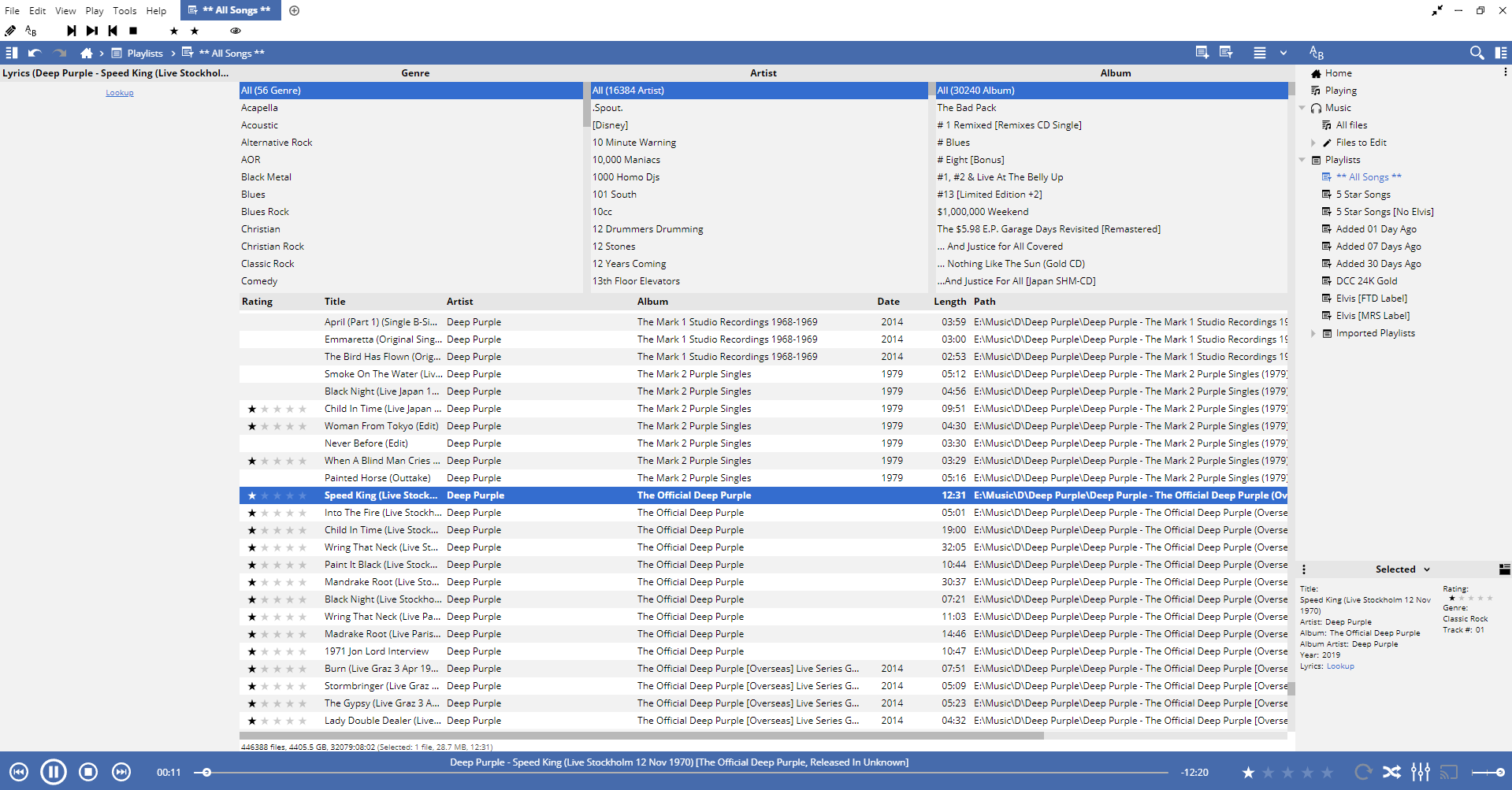
Greetings - I am using MM 2024.2.0.3178 on a Windows 11 box running an AMD Ryzen 9 5900x chip/32GB RAM/SSD drive, using the LIST view mode. I use an iTunes style visual configuration layout [embedded URL for the screencap inserted below; fullscreen at http://www.sdaughtry.com/downloads/1.png].

Re: Very large collections and MM speed
Hi,
Except Win 11, I almost have same configuration (See my signature) with few upgrades recently (Samsung 9100 Pro 8GB), I think that most difference in Speed from would be the Column Browser which is more resource heavy on such large library. Try to disable it.
It would be great if you can follow https://www.mediamonkey.com/forum/viewtopic.php?t=86643 and create full debug log for us to analyze to see where is the lag and what we can do to optimize it?
Except Win 11, I almost have same configuration (See my signature) with few upgrades recently (Samsung 9100 Pro 8GB), I think that most difference in Speed from would be the Column Browser which is more resource heavy on such large library. Try to disable it.
It would be great if you can follow https://www.mediamonkey.com/forum/viewtopic.php?t=86643 and create full debug log for us to analyze to see where is the lag and what we can do to optimize it?
Best regards,
Peke
MediaMonkey Team lead QA/Tech Support guru
Admin of Free MediaMonkey addon Site HappyMonkeying
How to attach PICTURE/SCREENSHOTS to forum posts
Peke
MediaMonkey Team lead QA/Tech Support guru
Admin of Free MediaMonkey addon Site HappyMonkeying
How to attach PICTURE/SCREENSHOTS to forum posts
Re: Very large collections and MM speed
Hi Peke,
I downloaded/installed/ran the debug version of MM; I then opened several playlists (including the *everything* playlist) and examined the properties of a random MP3 track. I then sent the debug log after following the prompts, which then generated "2E320000".
Note: I have used the "Manage database" option with all four checkboxes under Maintenance being check-marked to ensure the tables/indices were healthy. All is good <g>
I downloaded/installed/ran the debug version of MM; I then opened several playlists (including the *everything* playlist) and examined the properties of a random MP3 track. I then sent the debug log after following the prompts, which then generated "2E320000".
Note: I have used the "Manage database" option with all four checkboxes under Maintenance being check-marked to ensure the tables/indices were healthy. All is good <g>
Re: Very large collections and MM speed
Strange, initial loading does take a bit as described, but it's lots of data that needs to be read from disc.
However, clicking around the Column Filter and back to All loads nearly instantly with nearly the same amount of files. What counts for Genre, Artist and Album are you working with in the Column Filter? Also is there large delays in your navigation (ie. you select something in the Column Filter and lets say 10 minutes later you navigate back to All)?
However, clicking around the Column Filter and back to All loads nearly instantly with nearly the same amount of files. What counts for Genre, Artist and Album are you working with in the Column Filter? Also is there large delays in your navigation (ie. you select something in the Column Filter and lets say 10 minutes later you navigate back to All)?
Download MediaMonkey ♪ License ♪ Knowledge Base ♪ MediaMonkey for Windows 2024 Help ♪ MediaMonkey for Android Help
Lowlander (MediaMonkey user since 2003)
Lowlander (MediaMonkey user since 2003)
Re: Very large collections and MM speed
Greetings,
I have playlists built to
1. Display everything in the collection (i.e. unfiltered)
2. Display everything that I've rated as 5 stars (7419 files)
3. Display files within the 5 star rated category (filter within a filter)
4. Display files that I've added to the collection in 1/7/30 day intervals in separate playlists
Moving in-between playlist items 2-4 is speedy; however, pulling all 466,388 files and rebuild the genre (56 items), artists (16384 items) and album (30240 items) and redisplay them onscreen one by one (they literally take 1-2 seconds apiece to redisplay themselves) is understandably laggy, but a tad frustrating nonetheless when working with MM.
Once everything is displayed onscreen and I click on a column filter entry (e.g. Genre = Rock) perhaps 1.5 seconds is required to subsequently rebuild the artist and album columns and then display the list of songs that meets the query condition criteria. Clicking again on an entry in the Artist column filter nearly instantly redisplays that query condition, and the same with selecting an album. However, when it comes time to selecting all 3 ALL entries at the top of each column browser list the entire list of files has to be rebuilt, and the lag of 7-8 seconds then happens again.
Within the list control of song files, I have the following columns defined: rating, title, artist, album, date, length, and path. That's all I need with playing with data, and I don't know if adding additional columns would further slow things down
Cheers,
Scott
I have playlists built to
1. Display everything in the collection (i.e. unfiltered)
2. Display everything that I've rated as 5 stars (7419 files)
3. Display files within the 5 star rated category (filter within a filter)
4. Display files that I've added to the collection in 1/7/30 day intervals in separate playlists
Moving in-between playlist items 2-4 is speedy; however, pulling all 466,388 files and rebuild the genre (56 items), artists (16384 items) and album (30240 items) and redisplay them onscreen one by one (they literally take 1-2 seconds apiece to redisplay themselves) is understandably laggy, but a tad frustrating nonetheless when working with MM.
Once everything is displayed onscreen and I click on a column filter entry (e.g. Genre = Rock) perhaps 1.5 seconds is required to subsequently rebuild the artist and album columns and then display the list of songs that meets the query condition criteria. Clicking again on an entry in the Artist column filter nearly instantly redisplays that query condition, and the same with selecting an album. However, when it comes time to selecting all 3 ALL entries at the top of each column browser list the entire list of files has to be rebuilt, and the lag of 7-8 seconds then happens again.
Within the list control of song files, I have the following columns defined: rating, title, artist, album, date, length, and path. That's all I need with playing with data, and I don't know if adding additional columns would further slow things down
Cheers,
Scott