Artwork primary source
Moderator: Gurus
Artwork primary source
How can I tell MediaMonkey Desktop and Android to retrieve the artwork from the tags—that is, from the file itself? Currently, it always retrieves it from the directory, which means I often see the back of a CD cover.
Re: Artwork primary source
Artwork from tags should always be shown, are you saying it's not? Ie. Properties > Artwork doesn't show it all?
If so, which build (Help > About) of MediaMonkey and what file type(s)?
If so, which build (Help > About) of MediaMonkey and what file type(s)?
Download MediaMonkey ♪ License ♪ Knowledge Base ♪ MediaMonkey for Windows 2024 Help ♪ MediaMonkey for Android Help
Lowlander (MediaMonkey user since 2003)
Lowlander (MediaMonkey user since 2003)
Re: Artwork primary source
Hi,
its MediaMonkey 2024.2.2.3222
Format is aac in m4a.
As you see in the background Playing information it uses not the image stored in tag:
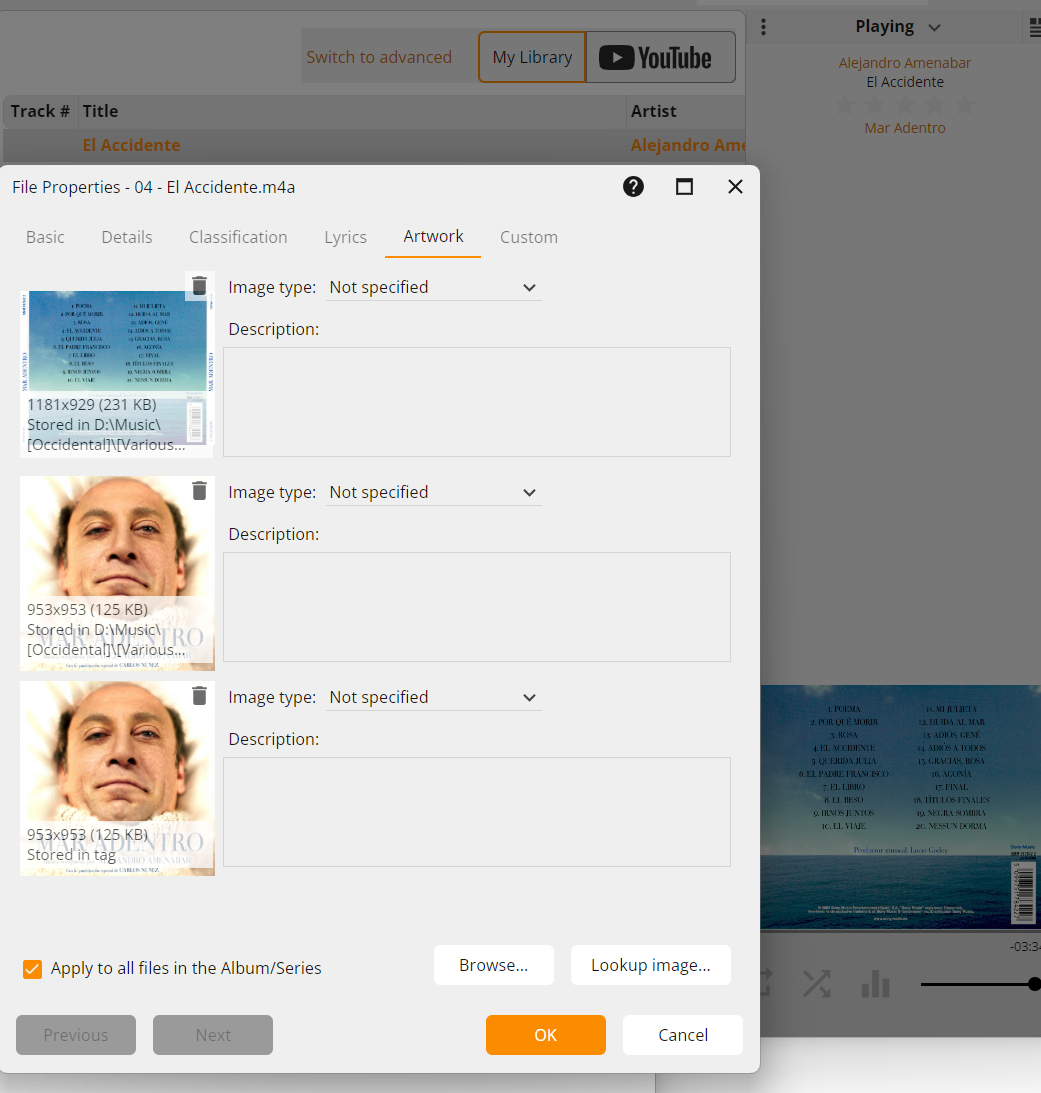
This also applies to MediaMonkey on Android.
its MediaMonkey 2024.2.2.3222
Format is aac in m4a.
As you see in the background Playing information it uses not the image stored in tag:
This also applies to MediaMonkey on Android.
Re: Artwork primary source
What are the filenames of the external Artwork files?
Note that you can disable scanning for external Artwork (this won't remove them from files already having external Artwork associated in MediaMonkey).
Note that you can disable scanning for external Artwork (this won't remove them from files already having external Artwork associated in MediaMonkey).
Download MediaMonkey ♪ License ♪ Knowledge Base ♪ MediaMonkey for Windows 2024 Help ♪ MediaMonkey for Android Help
Lowlander (MediaMonkey user since 2003)
Lowlander (MediaMonkey user since 2003)
Re: Artwork primary source
The names of the files are:
BSO_Mar_Adentro--Trasera[1].jpg
Cover.jpg
The first one is which is shown while playing.
If you mean the setting "Scan file directories for Artwork" then it's already turned off.
BSO_Mar_Adentro--Trasera[1].jpg
Cover.jpg
The first one is which is shown while playing.
If you mean the setting "Scan file directories for Artwork" then it's already turned off.
Re: Artwork primary source
Do you know which version of MediaMonkey first scanned the files?
Download MediaMonkey ♪ License ♪ Knowledge Base ♪ MediaMonkey for Windows 2024 Help ♪ MediaMonkey for Android Help
Lowlander (MediaMonkey user since 2003)
Lowlander (MediaMonkey user since 2003)
Re: Artwork primary source
No, I don't know. But it must have been at least one version prior to the current major version and probably the age of my profile: Jun 22, 2021
Ah, but what might be even more important is that it was an import from iTunes.
Ah, but what might be even more important is that it was an import from iTunes.
Re: Artwork primary source
If you can, this will remove the files from Playlists and you loose Play History as well, remove the files from that 1 example Album from the Library and rescan. Do you still get the same result?
Download MediaMonkey ♪ License ♪ Knowledge Base ♪ MediaMonkey for Windows 2024 Help ♪ MediaMonkey for Android Help
Lowlander (MediaMonkey user since 2003)
Lowlander (MediaMonkey user since 2003)
Re: Artwork primary source
After that, only the image in the tag will be displayed.
Re: Artwork primary source
Did you have scan for Artwork disabled? In that case that would be expected.
Download MediaMonkey ♪ License ♪ Knowledge Base ♪ MediaMonkey for Windows 2024 Help ♪ MediaMonkey for Android Help
Lowlander (MediaMonkey user since 2003)
Lowlander (MediaMonkey user since 2003)
Re: Artwork primary source
Yes, its disabled now. So how can I fix this in my whole DB without loosing the metadata?
Re: Artwork primary source
This can be done with MediaMonkey 2027, using right click > Edits Tags / Artwork > Artwork > Delete external Artworks if embedded exists.
Download MediaMonkey ♪ License ♪ Knowledge Base ♪ MediaMonkey for Windows 2024 Help ♪ MediaMonkey for Android Help
Lowlander (MediaMonkey user since 2003)
Lowlander (MediaMonkey user since 2003)
Re: Artwork primary source
Now that I know it was wrong in the database, I fixed it myself right there. Thanks for the info, and I think the “Scan file directories for artwork” setting should be disabled by default. It doesn't do what I'd expect, and it ends up causing chaos in the cover display.
Thank you for your help.
Thank you for your help.