MP3 CD Burning
Moderator: Gurus
MP3 CD Burning
I am one of the few users who still have CD player in the car and like to burn MP3 CDs for road trips. I understand this may be a thing of the past. But...here is my issue. I select a playlist or have MM% generate of the auto playlists. I have to Highlight all the files to copy them to my burning software. But the burning software does not keep the same file order. Is there someway to use the playlist order number to go into the burner? Another software possibly? How do others do it?
Re: MP3 CD Burning
Are you doing right click on the first file in the selection?
Download MediaMonkey ♪ License ♪ Knowledge Base ♪ MediaMonkey for Windows 2024 Help ♪ MediaMonkey for Android Help
Lowlander (MediaMonkey user since 2003)
Lowlander (MediaMonkey user since 2003)
Re: MP3 CD Burning
No. I either Cntl-A and select the whole playlist, then drag and drop, or Cntl-C then Cntl-V into the burner software. The playlist numbers do not get copied.
Re: MP3 CD Burning
Try D&D from the first file in the selection. Does that work?
Download MediaMonkey ♪ License ♪ Knowledge Base ♪ MediaMonkey for Windows 2024 Help ♪ MediaMonkey for Android Help
Lowlander (MediaMonkey user since 2003)
Lowlander (MediaMonkey user since 2003)
Re: MP3 CD Burning
No. It places all the files in the Disc Layout Editor of the burner, but automatically sorts them according to OS Filepath. (My playlist has files located in a variety of folders. If there happens to be more than one file from the same album, then those are sorted by track #. In the layout editor I have options to change the sort according to size, date and name. But no option for playlist number which is not carried over.
Re: MP3 CD Burning
Hi,
OK here is how I do this for USB and for DVD/CD Burning.
In MM5 under Devices and Services you can add Local Folder to be Sync Device and once you set it up you can then either copy files to USB or Burn them to DVD/CD for Road trips and they should play in Filename order. Here are the steps how I do it:
1. CREATE SYNC PROFILE FOR LOCAL FOLDER
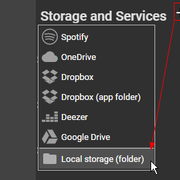
2. SELECT PLAYLISTS I WANT TO COPY/BURN
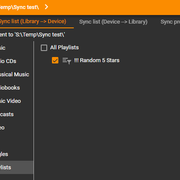
3. SET SYNC DESTINATION MASK FOR MUSIC AND OTHERS TO "\<Playlist>\<Auto Number>. <Title> - <Artist>"
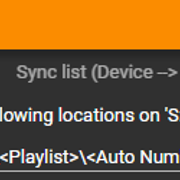
4. DO THE SYNC
5. COPY/BURN ALL CREATED SUB FOLDERS AND FILES to USB/DVD/CD AND THEN DELETE CONTENT OF THE FOLDER
6. ENJOY ROAD TRIP
OK here is how I do this for USB and for DVD/CD Burning.
In MM5 under Devices and Services you can add Local Folder to be Sync Device and once you set it up you can then either copy files to USB or Burn them to DVD/CD for Road trips and they should play in Filename order. Here are the steps how I do it:
1. CREATE SYNC PROFILE FOR LOCAL FOLDER
2. SELECT PLAYLISTS I WANT TO COPY/BURN
3. SET SYNC DESTINATION MASK FOR MUSIC AND OTHERS TO "\<Playlist>\<Auto Number>. <Title> - <Artist>"
4. DO THE SYNC
5. COPY/BURN ALL CREATED SUB FOLDERS AND FILES to USB/DVD/CD AND THEN DELETE CONTENT OF THE FOLDER
6. ENJOY ROAD TRIP
Best regards,
Peke
MediaMonkey Team lead QA/Tech Support guru
Admin of Free MediaMonkey addon Site HappyMonkeying



How to attach PICTURE/SCREENSHOTS to forum posts
Peke
MediaMonkey Team lead QA/Tech Support guru
Admin of Free MediaMonkey addon Site HappyMonkeying
How to attach PICTURE/SCREENSHOTS to forum posts
Re: MP3 CD Burning
Thanks Peke
Looks great. Unfortunately ran out of time. Leaving tomorrow. I'll try it when I get back.
Looks great. Unfortunately ran out of time. Leaving tomorrow. I'll try it when I get back.
Re: MP3 CD Burning
Hi,
My pleasure, drive safe and above all enjoy!
Happy Monkeying!
My pleasure, drive safe and above all enjoy!
Happy Monkeying!
Best regards,
Peke
MediaMonkey Team lead QA/Tech Support guru
Admin of Free MediaMonkey addon Site HappyMonkeying
How to attach PICTURE/SCREENSHOTS to forum posts
Peke
MediaMonkey Team lead QA/Tech Support guru
Admin of Free MediaMonkey addon Site HappyMonkeying
How to attach PICTURE/SCREENSHOTS to forum posts
MM5 CD Bruning Via Sync Folder
I'm trying to figure out a good workflow for burning playlists to CDs from MM5. Limited in knowledge, but trying to learn. I can work this simple procedure.
1. Create playlist
2. Select files (Ctrl-A)
3. Send to Folder
4. Copy folder contents (or folder) to Burn software (currently IMGBURN)
5. Burn CD.
Problems I have are: sort order in burn, doing volume balance for the CD, other unforeseen issues
I would like to know/read instructions for creating and using a sync folder. How to create and organize such folder. Maybe that will help do a better job of carrying my playlists when I go out. User @Peke mentioned the sync folder in a post a few years past. ( viewtopic.php?p=511048&hilit=mm5+burn+mp3+cd#p511048 ) But I guess I need more basic instruction.
1. Create playlist
2. Select files (Ctrl-A)
3. Send to Folder
4. Copy folder contents (or folder) to Burn software (currently IMGBURN)
5. Burn CD.
Problems I have are: sort order in burn, doing volume balance for the CD, other unforeseen issues
I would like to know/read instructions for creating and using a sync folder. How to create and organize such folder. Maybe that will help do a better job of carrying my playlists when I go out. User @Peke mentioned the sync folder in a post a few years past. ( viewtopic.php?p=511048&hilit=mm5+burn+mp3+cd#p511048 ) But I guess I need more basic instruction.
Re: MM5 CD Bruning Via Sync Folder
MediaMonkey can burn audio CD's.
Download MediaMonkey ♪ License ♪ Knowledge Base ♪ MediaMonkey for Windows 2024 Help ♪ MediaMonkey for Android Help
Lowlander (MediaMonkey user since 2003)
Lowlander (MediaMonkey user since 2003)
Re: MM5 CD Bruning Via Sync Folder
Sorry. Wasn't clear. MP3 CDs.
Re: MP3 CD Burning
The sync-folder workflow looks like the cleanest way to preserve playlist order before burning; I’ll give that a try with MP3 CDs.OldPilot wrote: ↑Sun Jun 25, 2023 10:00 am I am one of the few users who still have CD player in the car and like to burn MP3 CDs for road trips. I understand this may be a thing of the past. But...here is my issue. I select a playlist or have MM% generate of the auto playlists. I have to Highlight all the files to copy them to my burning software. But the burning software does not keep the same file order. Is there someway to use the playlist order number to go into the burner? Another software possibly? How do others do it?