Page 2 of 2
Re: MM 24 Beta requires different driver?
Posted: Sun Nov 10, 2024 1:41 pm
by Lowlander
So you deleted persistent.json, started MediaMonkey and did see an improvement, but not fully.
Have you tried switching Skins under Tools > Options > Skins? Does that help now? Also have you since starting updated to the
latest 2074 Monkey 2024 release.
Re: MM 24 Beta requires different driver?
Posted: Mon Nov 11, 2024 7:51 pm
by MaloneRainja
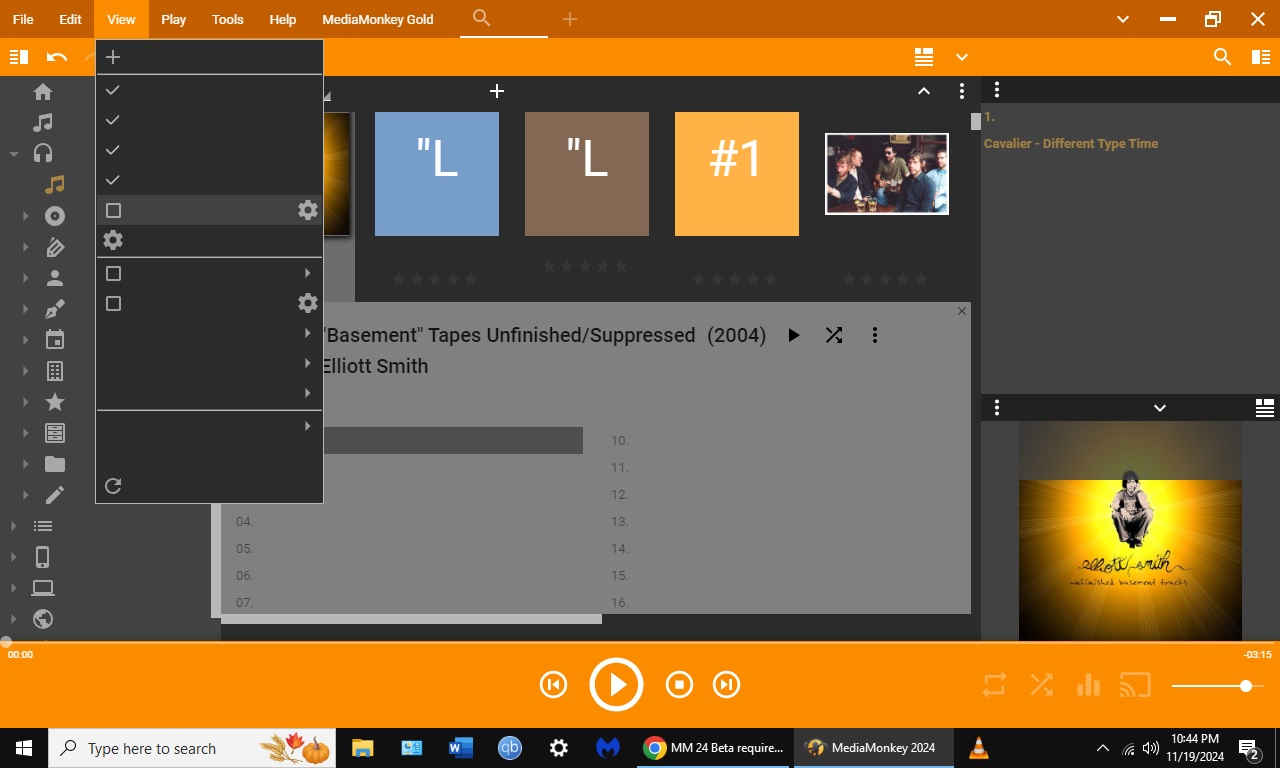
I renamed persistent.json and added ".old" at the end. Should I just delete it? Yes, its improved. Now it has colors and images but text can't be read like track names etc. The list of tracks just blends into the background, there's nothing there to read. I don't think I can pick a Skin because the top bar menu is unreadable.
Re: MM 24 Beta requires different driver?
Posted: Mon Nov 11, 2024 8:50 pm
by CrashMonkey
Got a printscreen how it looks now?
Re: MM 24 Beta requires different driver?
Posted: Mon Nov 11, 2024 8:54 pm
by Lowlander
Alt+T and pick the second-last item in the menu, in Options you may need to click the different options on the left as you may also be missing text.
Re: MM 24 Beta requires different driver?
Posted: Tue Nov 19, 2024 11:41 pm
by MaloneRainja
Thanks but none of this seems to be fixing the problem. I'm just going to delete the new one and use iTunes or something. I need to be able to put songs on my phone.
Re: MM 24 Beta requires different driver?
Posted: Tue Nov 19, 2024 11:49 pm
by MaloneRainja
CrashMonkey wrote: ↑Mon Nov 11, 2024 8:50 pm
Got a printscreen how it looks now?
Some of the text comes and goes as you move the cursor, like the top bar menu. I also noticed the song text was there when I first open media monkey but disappears within a second or so of switching windows back to MM24.
https://i.imghippo.com/files/CHRs3223WvY.jpg
Re: MM 24 Beta requires different driver?
Posted: Wed Nov 20, 2024 12:46 am
by Lowlander
Do you have some sort window management/skinning in Windows itself or any other type of customization to Windows?
What if you install the
latest MediaMonkey 2024 as a separate Portable Install (select in installer)? Does it suffer from the same problem?
Re: MM 24 Beta requires different driver?
Posted: Wed Nov 20, 2024 11:08 am
by rusty
Another user experienced what may be a variant of this issue:
viewtopic.php?t=106955
In his case, the workaround is to disable Text scaling in accessibility settings. Sooo:
1) In Windows Settings > System > Display, what is 'Scale' set to? Do you have custom settigs for Accessibility > Text Size ? If so, does setting both to 100% solve the problem?
2) In Windows Settings > System > Display > Advanced display, is 'Automatically manage color for apps' enabled? Does disabling it help?
3) Did you ever try a clean install of MediaMonkey to a temp directory in
Portable mode? Does it help?
-Rusty
Re: MM 24 Beta requires different driver?
Posted: Sun Nov 24, 2024 12:02 pm
by MaloneRainja
1. Each was set to 100% already
2. Didn't have this option in my advanced settings
3. Exact same problems
Re: MM 24 Beta requires different driver?
Posted: Sun Nov 24, 2024 1:33 pm
by MaloneRainja
So I left MM24 as portable only and unplugged the flash drive and went ahead and downloaded MM5 again to my desktop. This time MM5 defaulted to the same skin that MM24 had, and in the old MM everything looked fine and was functional. I'm guessing something in that beta version is still messed up.
Re: MM 24 Beta requires different driver?
Posted: Mon Nov 25, 2024 5:56 am
by Peke
MaloneRainja wrote: ↑Sun Nov 24, 2024 1:33 pm
So I left MM24 as portable only and unplugged the flash drive and went ahead and downloaded MM5 again to my desktop. This time MM5 defaulted to the same skin that MM24 had, and in the old MM everything looked fine and was functional. I'm guessing something in that beta version is still messed up.
May I ask you to open support ticket, in order to take more direct approach? We would be very grateful to get to bottom of this ASAP.
Re: MM 24 Beta requires different driver?
Posted: Thu Nov 28, 2024 12:01 pm
by Peke
MaloneRainja wrote: ↑Sun Nov 24, 2024 1:33 pm
So I left MM24 as portable only and unplugged the flash drive and went ahead and downloaded MM5 again to my desktop. This time MM5 defaulted to the same skin that MM24 had, and in the old MM everything looked fine and was functional. I'm guessing something in that beta version is still messed up.
I created Ticket #8066 so that we can in more details and more directly address all the issues you have in MM.
Re: MM 24 Beta requires different driver?
Posted: Fri Nov 29, 2024 7:43 pm
by MaloneRainja
Thank you. I received an email about that the other day. Not sure if it matters but I'm running an older desktop with Windows 10.
Re: MM 24 Beta requires different driver?
Posted: Sun Dec 01, 2024 2:44 pm
by Peke
Hi,
I am also running Windows 10. Lets continue in Ticket.