Crash when closing 3081
Moderator: Gurus
-
Riegelstriegel
- Posts: 83
- Joined: Wed May 12, 2021 10:39 am
Crash when closing 3081
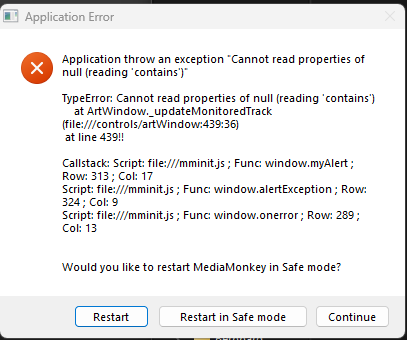
Hi, I had a crash yesterday when closing Media Monkey 3081 after a session of a few hours during which I had been listening to music and editing some files. I don't know what exactly caused it and don't have further logs but maybe the screenshot of the error message gives you some idea.
Re: Crash when closing 3081
Hi,
Can you search for .EL file on your HDD, ZIP it and open support ticket to attach ZIP file.
that will tell us what caused the crash.
Can you search for .EL file on your HDD, ZIP it and open support ticket to attach ZIP file.
that will tell us what caused the crash.
Best regards,
Peke
MediaMonkey Team lead QA/Tech Support guru
Admin of Free MediaMonkey addon Site HappyMonkeying



How to attach PICTURE/SCREENSHOTS to forum posts
Peke
MediaMonkey Team lead QA/Tech Support guru
Admin of Free MediaMonkey addon Site HappyMonkeying
How to attach PICTURE/SCREENSHOTS to forum posts
-
Riegelstriegel
- Posts: 83
- Joined: Wed May 12, 2021 10:39 am
Re: Crash when closing 3081
Hi Peke, can you let me know the exact path to the file? Searching my C: drive didn't find anything.
-
CrashMonkey
- Posts: 223
- Joined: Sat Oct 21, 2023 10:34 am
Re: Crash when closing 3081
If portable installation, then in the location of mediamonkey inside the folder of Portable, inside that folder locate: MediaMonkey.el
If normal installation.
WindowsKey+R (opens run window)
Then type %AppData%
Press Enter.
Inside the window that opend, find the folder MediaMonkey
inside that folder locate: MediaMonkey.el
If normal installation.
WindowsKey+R (opens run window)
Then type %AppData%
Press Enter.
Inside the window that opend, find the folder MediaMonkey
inside that folder locate: MediaMonkey.el
I am using MediaMonkey on my Retro Systems, using the latest Beta build on Windows 11. Managing ~54k files
-
Riegelstriegel
- Posts: 83
- Joined: Wed May 12, 2021 10:39 am
Re: Crash when closing 3081
Nope, I don't have such a file there. Non-portable, and I checked both the appdata folder and the program files folder. I am currently on the non-debug build if that should matter. Or does the el file get deleted when I restart MM after a crash?
Not sure what the el file does exactly after all...
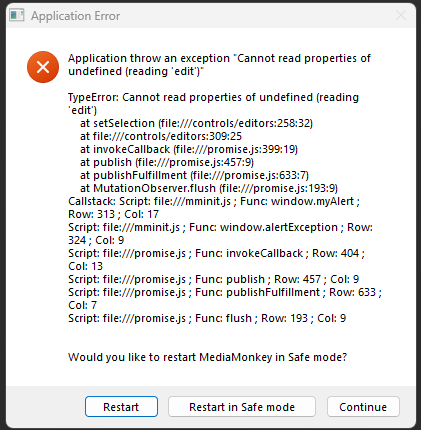
EDIT: Another crash, while editing Artist tags in the media tree:
Still no el file found. Does it require the debug version?
Not sure what the el file does exactly after all...
EDIT: Another crash, while editing Artist tags in the media tree:
Still no el file found. Does it require the debug version?
Re: Crash when closing 3081
Hi,
Yes, Debug Version needs to be installed.
Yes, Debug Version needs to be installed.
Best regards,
Peke
MediaMonkey Team lead QA/Tech Support guru
Admin of Free MediaMonkey addon Site HappyMonkeying
How to attach PICTURE/SCREENSHOTS to forum posts
Peke
MediaMonkey Team lead QA/Tech Support guru
Admin of Free MediaMonkey addon Site HappyMonkeying
How to attach PICTURE/SCREENSHOTS to forum posts