Album art downloads on Android
Moderator: Gurus
Album art downloads on Android
The Android app has been downloading completely random images for album covers. Not even pictures of the artist or the wrong side of a CD or something as sometimes happens, it's just completely 100% random images. I told it to search for an album cover and it downloaded a random picture of a couple of women. Then it downloaded what appears to be a infographic for glaucoma in Spanish. I can clear it and tell it to search again and it just keeps pulling the most random pictures.
Re: Album art downloads on Android
That’s strange—are you sure you configured the app correctly? Sometimes the settings can be a bit finicky. I’ve run into similar issues myself, though it often depends on the sources used for the images. Have you tried checking if it happens with other albums?
Last edited by Posid19 on Mon Jun 29, 2026 4:15 am, edited 1 time in total.
Art totally broken
Art search even more broken than 1311. Can only find complete garbage most of the time. Simple google search better instantly. What on earth are you guys searching?
Re: Album art downloads on Android
Same garbage on 1316.
Re: Album art downloads on Android
Please divulge your algorithm for art search.
Re: Album art downloads on Android
As of right now, this is fixed. Not by an upgrade, but rather by time of day, because whatever source they are using for search is broken a large fraction of the time. Sometimes it even downloads scads of porn pics. What is the algorithm being used to get album art? It seems totally random in when and how it searches, and the sources need to be revealed because much of the time they are either broken or hacked. Google would be a better source 99% of the time.
 album art UI, UX counterintuitive
mma 1316 on android 16 on galaxy s24 phone.
In searching for album art, the yes/no question about overriding albumart.jpg is confusing. Yes means do not override. No means do override. Yes means no, no means yes. Also, the arrow picture can mean replace what's on the left with what's on the right, or move what's on the left into/instead of what's on the right. Both of these are backwards to how I would think about it.
Also the whole UI is apparently predicated on the use case assumption that there is a separate directory for each album, into which a single album cover goes for all the tracks. That is not my use case. My use case is that I have a large number of tracks in a flat directory, because i don't care what album they came from, and typically I only even keep a track or two from any particular album. So for me "album art" just means "track art," which optimally is a cover that lists at least the artist on it. I suspect there are many others like me, which is why you are adding per track art. The UI needs to be fixed so that it makes sense for that use case. You should not be making all sorts of default assumptions based on one directory per album.
Seems like maybe you could use a global setting of "assume per track art only" vs "assume one album per directory."
In addition, for per track art, it can also make sense to embed the art in the track metadata. This then avoids messes with db and lookup. I also ran into a problem when transferring to a new phone because absolute paths for art were different on new phone, in this case moving from sd card to internal. That would not have been a problem if art were embedded. Storage space is cheap, or at least was if you bought it before the AI boom. Yet another problem is filling in null fields, which than causes trouble in searching for art.
You also need to verify whether your source for album art is even operating correctly, since often it is not, but that's a different bug.
--peter
In searching for album art, the yes/no question about overriding albumart.jpg is confusing. Yes means do not override. No means do override. Yes means no, no means yes. Also, the arrow picture can mean replace what's on the left with what's on the right, or move what's on the left into/instead of what's on the right. Both of these are backwards to how I would think about it.
Also the whole UI is apparently predicated on the use case assumption that there is a separate directory for each album, into which a single album cover goes for all the tracks. That is not my use case. My use case is that I have a large number of tracks in a flat directory, because i don't care what album they came from, and typically I only even keep a track or two from any particular album. So for me "album art" just means "track art," which optimally is a cover that lists at least the artist on it. I suspect there are many others like me, which is why you are adding per track art. The UI needs to be fixed so that it makes sense for that use case. You should not be making all sorts of default assumptions based on one directory per album.
Seems like maybe you could use a global setting of "assume per track art only" vs "assume one album per directory."
In addition, for per track art, it can also make sense to embed the art in the track metadata. This then avoids messes with db and lookup. I also ran into a problem when transferring to a new phone because absolute paths for art were different on new phone, in this case moving from sd card to internal. That would not have been a problem if art were embedded. Storage space is cheap, or at least was if you bought it before the AI boom. Yet another problem is filling in null fields, which than causes trouble in searching for art.
You also need to verify whether your source for album art is even operating correctly, since often it is not, but that's a different bug.
--peter
Re: Album art downloads on Android
Broken album art!
This Grateful Dead album is a matrix mix of audience and sbd recordings (6/23/1974) and as such it has no commercial art to download.
https://postimg.cc/gallery/CVDMpxM
The first track's art is mildly amusing, the second track... what is this?
(FYI if you're wondering about the track names: I do not have giant 24-bit flac music files on my tablet. I resampled my entire library to 192kb mp3s for the tablet. But I don't think the file type has anything to do with the album art bug.)
Josh
This Grateful Dead album is a matrix mix of audience and sbd recordings (6/23/1974) and as such it has no commercial art to download.
https://postimg.cc/gallery/CVDMpxM
The first track's art is mildly amusing, the second track... what is this?
(FYI if you're wondering about the track names: I do not have giant 24-bit flac music files on my tablet. I resampled my entire library to 192kb mp3s for the tablet. But I don't think the file type has anything to do with the album art bug.)
Josh
Album art
Maybe I am confused, but this is the area for mma bugs, and the link is for mmw.
MMA adding art is seriously broken. I believe this is due to some combination of
Please tell us something about the algorithm you are using to obtain art.
At this point, a google search initiated from the device running mma, with a method to choose would be far far superior.
For some related UI suggestions, see my posts at viewtopic.php?p=533680#p533680
this is for build 1316.
MMA adding art is seriously broken. I believe this is due to some combination of
- bad algorithm
- exhausted quota on image sources that mm uses
- hacked image sources (for example leading to suggestions of porn pics)
- bad choice of fallback options when primary sources aren't available
- bad interaction with built-in losing android media handling
Please tell us something about the algorithm you are using to obtain art.
At this point, a google search initiated from the device running mma, with a method to choose would be far far superior.
For some related UI suggestions, see my posts at viewtopic.php?p=533680#p533680
this is for build 1316.
Re: Album art downloads on Android
I have tested on more than 1000 songs over past two days.
Here is what I have done in MMA:
1. Set Auto Album art Lookup
2. Loaded around 2000 tracks in MMA that do not have Album art, but Correct Metadata including numerous tracks with questionable Album names like "Pornograffiti" or Artist "Porno Graffitti", "E-rotic" along side track names like "Help me Dr. Dick",...
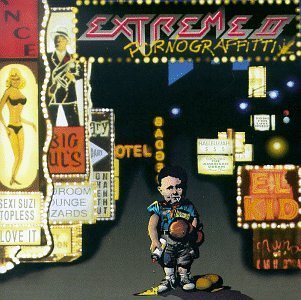


3. Scrolled thru tracks so that MMA search for Album art
4. No a single track got Porn images, but either found correct art or no art
5. For tracks with no art I manually initiated Search and every time in 5 proposed images I got correct Album art.
That for around 1000 tracks, also tried same on some tracks in MMW
Can you please write down exact steps you do, are you able to locate correct image and if possible Artist, Title, Album of 10 tracks?
EDIT: Can you point what post and where we deleted it?
Best regards,
Peke
MediaMonkey Team lead QA/Tech Support guru
Admin of Free MediaMonkey addon Site HappyMonkeying



How to attach PICTURE/SCREENSHOTS to forum posts
Peke
MediaMonkey Team lead QA/Tech Support guru
Admin of Free MediaMonkey addon Site HappyMonkeying
How to attach PICTURE/SCREENSHOTS to forum posts
Re: Album art downloads on Android
Interesting, since it's totally the opposite of my observations. What version of android are you using, and on what device?
I don't get porn pictures every time, but sometimes. The pictures returned bear no relation to the search terms, so putting in porn as a search term is not likely to get you porn, anyway. I also observe that removing a valid album title is more likely to find art than keeping it in the search query. The more common failure is either a bevy of irrelevant pictures, like cats or spreadsheets or anime, or just a single hit on an also irrelevant image.
Someone else also complained about this behavior, so it is not because I am the only person in town who forgot they took shrooms.
Also, it might depend on time of day, ISP, or location. That is why I am asking about the algorithm, to try to understand what is exactly going on.
I also note that sometimes, I can successfully find 10 images in a row, but after that, it is as if some quota was exceeded, and only garbage is returned.
As a reminder, I am using beta 1316 on android 16 on a samsung galaxy s24 phone with up to date software.
So here is an example. Right now (~1800PDT aug 4 2026) I searched for art for the track with metadata "Blondie, Rapture, Autoamerican" where the search query is shown as "Blondie + Autoamerican", after deleting a bogus result from "android media". Zero results. Using google for the same search, instant result of that album cover. Trying the search again, results in a single image of a painting of the Virgin Mary, who doesn't really look like Debbie Harry, even if it rhymes. Truncating the lookup criteria for album to just "A" does yield a few images of Blondie, but not that album cover. but dozens of images of brownies of various kinds. That result is even acceptable since all I really want is any image of Blondie, but usually that approach does not yield even one single relevant image.
Note that my directory structure is FLAT. MM wants a structure of dir = album and track in album dir. I don't keep albums; I keep tracks. That assumption in the code might be affecting these searches since the metadata does not agree with the parent dir of the track file.
Any ideas other than "works for me"?
So here are exact steps:
* I have turned off auto lookup, because that was just causing me to have to delete bogus results.
* Looking at playing list, shuffled (i.e. not in alpha order)
* Select a track, which begins to play.
* swipe left to get to art image display
* click (touch) image (mm logo since no art yet) to bring down context menu items
* select magnifying glass
* mma switches to properties/art frame and starts a search
* finds results. In this case, for that same track, a lot of pictures of the Eiffel Tower and some other Paris landmarks. Not one image of Blondie or any album cover of any actual album.
I should also mention that these files might have various versions of metadata, including two simultaneously, including v1. I have not checked that particular track for which it is.
--peter
I don't get porn pictures every time, but sometimes. The pictures returned bear no relation to the search terms, so putting in porn as a search term is not likely to get you porn, anyway. I also observe that removing a valid album title is more likely to find art than keeping it in the search query. The more common failure is either a bevy of irrelevant pictures, like cats or spreadsheets or anime, or just a single hit on an also irrelevant image.
Someone else also complained about this behavior, so it is not because I am the only person in town who forgot they took shrooms.
Also, it might depend on time of day, ISP, or location. That is why I am asking about the algorithm, to try to understand what is exactly going on.
I also note that sometimes, I can successfully find 10 images in a row, but after that, it is as if some quota was exceeded, and only garbage is returned.
As a reminder, I am using beta 1316 on android 16 on a samsung galaxy s24 phone with up to date software.
So here is an example. Right now (~1800PDT aug 4 2026) I searched for art for the track with metadata "Blondie, Rapture, Autoamerican" where the search query is shown as "Blondie + Autoamerican", after deleting a bogus result from "android media". Zero results. Using google for the same search, instant result of that album cover. Trying the search again, results in a single image of a painting of the Virgin Mary, who doesn't really look like Debbie Harry, even if it rhymes. Truncating the lookup criteria for album to just "A" does yield a few images of Blondie, but not that album cover. but dozens of images of brownies of various kinds. That result is even acceptable since all I really want is any image of Blondie, but usually that approach does not yield even one single relevant image.
Note that my directory structure is FLAT. MM wants a structure of dir = album and track in album dir. I don't keep albums; I keep tracks. That assumption in the code might be affecting these searches since the metadata does not agree with the parent dir of the track file.
Any ideas other than "works for me"?
So here are exact steps:
* I have turned off auto lookup, because that was just causing me to have to delete bogus results.
* Looking at playing list, shuffled (i.e. not in alpha order)
* Select a track, which begins to play.
* swipe left to get to art image display
* click (touch) image (mm logo since no art yet) to bring down context menu items
* select magnifying glass
* mma switches to properties/art frame and starts a search
* finds results. In this case, for that same track, a lot of pictures of the Eiffel Tower and some other Paris landmarks. Not one image of Blondie or any album cover of any actual album.
I should also mention that these files might have various versions of metadata, including two simultaneously, including v1. I have not checked that particular track for which it is.
--peter
Re: Album art downloads on Android
Today, 12:50 pdt aug 7 2026, now works perfectly. What did I change? Nothing. Same version, same data, same set of tracks, no change to filesystem, no os or app updates.
So, I will again ask, why does this happen? Is it some kind of quota exceeded on art servers? Or what?
Regardless of the cause, it should not be offering up garbage results.
If the problem actually is some going over quota thing, that needs to be told to the user, rather than return garbage.
I have little doubt that if nothing has been changed at MM end, this problem will recur. Also, I guess this could be something funny about my ISP, which is Comcast, except I assume the images are returned to mma from mm servers, not from a random url handed to my running app?
So, I will again ask, why does this happen? Is it some kind of quota exceeded on art servers? Or what?
Regardless of the cause, it should not be offering up garbage results.
If the problem actually is some going over quota thing, that needs to be told to the user, rather than return garbage.
I have little doubt that if nothing has been changed at MM end, this problem will recur. Also, I guess this could be something funny about my ISP, which is Comcast, except I assume the images are returned to mma from mm servers, not from a random url handed to my running app?
Re: Album art downloads on Android
And now, about 3.5 hours later, 100% failure on every art search attempt. Only garbage gets returned.
Might also be a time of day issue with overload of servers, and secondary sources might be hacked or useless.
Might also be a time of day issue with overload of servers, and secondary sources might be hacked or useless.
Re: Album art downloads on Android
fyi, we're working on this and expect to have the issue fixed in the next beta build.
-Rusty
-Rusty