I AM slow; don't understand folder view

Get answers about using MediaMonkey 4 for Windows.

Moderator: Gurus

dps
Posts: 74
Joined: Tue Jun 12, 2007 4:25 pm

I AM slow; don't understand folder view

Post by dps »

I don't understand why the MM folder tree is so different than Explorer, which looks how I'd expect it to. On both of the expanded views shown, if you click a folder, two of the folder's listings are identical in appearance as far as the title of each piece, but the third folder view lists the same titles as the other two views except that now the track # is part of the title.

For simplicity's sake and to more quickly get to any particular view, I'd like things to look like Explorer presents the tree. Thanks for any help!
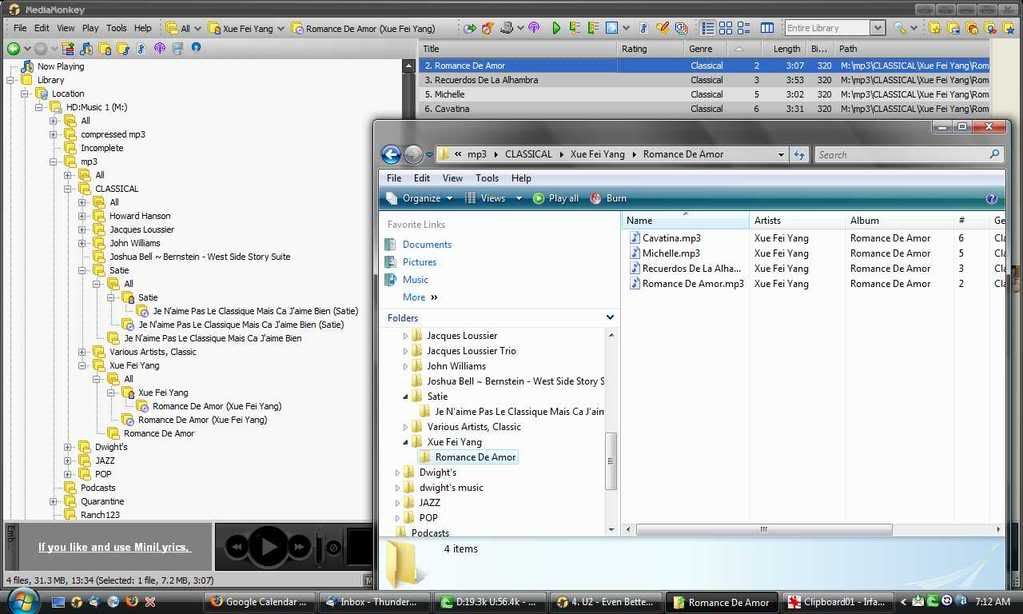
Image
Eyal
Posts: 3124
Joined: Sun Jun 26, 2005 9:27 am
Location: Québec
Contact:

Re: I AM slow; don't understand folder view

Post by Eyal »

That's because you open the ALL folder subnode. The ALL subnode will list you all tracks in the specific node regardless of its underneath subfolders structure. This ALL subnode is very useful when you want to apply a function on all tracks of the node.

This is the strength of MM, a feature you'll soon appreciate.

In the options you can set to display the ALL subnode at beginning (like it is now) or at the end of the list (useful if you don't often use it).
Skins for MediaMonkey: Cafe, Carbon, Helium, Spotify, Zekton. [ Wiki Zone ].
rovingcowboy
Posts: 14163
Joined: Sat Oct 25, 2003 7:57 am
Location: (Texas)
Contact:

Re: I AM slow; don't understand folder view

Post by rovingcowboy »

how did you get that window in meidamonkey where it has the two arrow buttons of previous and next?

i don't remeber seeing that window in monkey? :-?
roving cowboy / keith hall. My skins http://www.mediamonkey.com/forum/viewto ... =9&t=16724 for some help check on Monkey's helpful messages at http://www.mediamonkey.com/forum/viewto ... 4008#44008 MY SYSTEMS.1.Jukebox WinXp pro sp 3 version 3.5 gigabyte mb. 281 GHz amd athlon x2 240 built by me.) 2.WinXP pro sp3, vers 2.5.5 and vers 3.5 backup storage, shuttle 32a mb,734 MHz amd athlon put together by me.) 3.Dell demension, winxp pro sp3, mm3.5 spare jukebox.) 4.WinXp pro sp3, vers 3.5, dad's computer bought from computer store. )5. Samsung Galaxy A51 5G Android ) 6. amd a8-5600 apu 3.60ghz mm version 4 windows 7 pro bought from computer store.
Big_Berny
Posts: 1784
Joined: Mon Nov 28, 2005 11:55 am
Location: Switzerland
Contact:

Re: I AM slow; don't understand folder view

Post by Big_Berny »

@rc: It's there by default...
Image
Scripts in use: Genre Finder / Last.fm DJ / Magic Nodes / AutoRateAccurate / Last.FM Node
Skins in use: ZuneSkin SP / Eclipse SP
AutoRateAccurate 3.0.0 (New) - Rates all your songs in less than 5 seconds!
About me: icoaching - internet | marketing | design
rovingcowboy
Posts: 14163
Joined: Sat Oct 25, 2003 7:57 am
Location: (Texas)
Contact:

Re: I AM slow; don't understand folder view

Post by rovingcowboy »

no there are two green ones in monkey on the above screen shot there is blue ones on the other window of monkey.
and there is no title bar for monkey in that window so how'd that show up? :o

the layout does not even look like the same monkey i have? so i can't even test the bug to see if it is reproduce able. ?

:-?
roving cowboy / keith hall. My skins http://www.mediamonkey.com/forum/viewto ... =9&t=16724 for some help check on Monkey's helpful messages at http://www.mediamonkey.com/forum/viewto ... 4008#44008 MY SYSTEMS.1.Jukebox WinXp pro sp 3 version 3.5 gigabyte mb. 281 GHz amd athlon x2 240 built by me.) 2.WinXP pro sp3, vers 2.5.5 and vers 3.5 backup storage, shuttle 32a mb,734 MHz amd athlon put together by me.) 3.Dell demension, winxp pro sp3, mm3.5 spare jukebox.) 4.WinXp pro sp3, vers 3.5, dad's computer bought from computer store. )5. Samsung Galaxy A51 5G Android ) 6. amd a8-5600 apu 3.60ghz mm version 4 windows 7 pro bought from computer store.
spacefish
Posts: 1427
Joined: Mon Jan 14, 2008 7:21 am
Location: Denmark

Re: I AM slow; don't understand folder view

Post by spacefish »

It's not MM. It's Windows Explorer.
Image
MM Gold 3.0.3.1183 : Vista HP SP1 (x86) : Zen Stone (2GB)
Zekton: An original MM3 skin by Eyal.
Scripts in Use: Add/Remove PlayStat | Auto Album DJ | AutoRateAccurate | Backup
Case & Leading Zero Fixer | Classification & Genre Changer | Clean Scripts.ini | Clear
Field | Custom Report | Discogs Auto-Tag Web Search | Forget Crossfade | Invert
Selection/Select None | Last 100... | Lyricator | Lyrics to Instrumental | MonkeyRok
MusicBrainz Tagger | My Custom Nodes | Now Playing Art Node | Play History & Stats
Right Click for Reports | Right Click for Scripts | Right Click for Web | Stop After Current
WebNodes
Big_Berny
Posts: 1784
Joined: Mon Nov 28, 2005 11:55 am
Location: Switzerland
Contact:

Re: I AM slow; don't understand folder view

Post by Big_Berny »

@spacefish: No, I think he means MM. Don't confuse us! :)

@rc: Right click on the tree-view, then you have a option 'Show tree shortcuts'.
Image
Scripts in use: Genre Finder / Last.fm DJ / Magic Nodes / AutoRateAccurate / Last.FM Node
Skins in use: ZuneSkin SP / Eclipse SP
AutoRateAccurate 3.0.0 (New) - Rates all your songs in less than 5 seconds!
About me: icoaching - internet | marketing | design
spacefish
Posts: 1427
Joined: Mon Jan 14, 2008 7:21 am
Location: Denmark

Re: I AM slow; don't understand folder view

Post by spacefish »

rovingcowboy wrote:no there are two green ones in monkey on the above screen shot there is blue ones on the other window of monkey.
and there is no title bar for monkey in that window so how'd that show up? :o

the layout does not even look like the same monkey i have? so i can't even test the bug to see if it is reproduce able. ?

:-?
The blue ones are on the Explorer window. I'm pretty sure that's the window he's talking about.
Image
MM Gold 3.0.3.1183 : Vista HP SP1 (x86) : Zen Stone (2GB)
Zekton: An original MM3 skin by Eyal.
Scripts in Use: Add/Remove PlayStat | Auto Album DJ | AutoRateAccurate | Backup
Case & Leading Zero Fixer | Classification & Genre Changer | Clean Scripts.ini | Clear
Field | Custom Report | Discogs Auto-Tag Web Search | Forget Crossfade | Invert
Selection/Select None | Last 100... | Lyricator | Lyrics to Instrumental | MonkeyRok
MusicBrainz Tagger | My Custom Nodes | Now Playing Art Node | Play History & Stats
Right Click for Reports | Right Click for Scripts | Right Click for Web | Stop After Current
WebNodes
rovingcowboy
Posts: 14163
Joined: Sat Oct 25, 2003 7:57 am
Location: (Texas)
Contact:

Re: I AM slow; don't understand folder view

Post by rovingcowboy »

dang i was looking at the bottom of the image to make sure it was not some other image pasted in to the screenshot.
and it looked like it was part of mediamonkey. so i thought it was a new view. :oops:

thanks for letting me know spacefish.
that's what i get for only sleeping 3 hours and getting up at 3 am not yet awake when online.
:oops:

yep big berny i was talking about what is seen now as the explore window. dps was talking about mediamonkey.
roving cowboy / keith hall. My skins http://www.mediamonkey.com/forum/viewto ... =9&t=16724 for some help check on Monkey's helpful messages at http://www.mediamonkey.com/forum/viewto ... 4008#44008 MY SYSTEMS.1.Jukebox WinXp pro sp 3 version 3.5 gigabyte mb. 281 GHz amd athlon x2 240 built by me.) 2.WinXP pro sp3, vers 2.5.5 and vers 3.5 backup storage, shuttle 32a mb,734 MHz amd athlon put together by me.) 3.Dell demension, winxp pro sp3, mm3.5 spare jukebox.) 4.WinXp pro sp3, vers 3.5, dad's computer bought from computer store. )5. Samsung Galaxy A51 5G Android ) 6. amd a8-5600 apu 3.60ghz mm version 4 windows 7 pro bought from computer store.
Big_Berny
Posts: 1784
Joined: Mon Nov 28, 2005 11:55 am
Location: Switzerland
Contact:

Re: I AM slow; don't understand folder view

Post by Big_Berny »

Ok, in this case: Sorry spacefish, you were right! :)
Image
Scripts in use: Genre Finder / Last.fm DJ / Magic Nodes / AutoRateAccurate / Last.FM Node
Skins in use: ZuneSkin SP / Eclipse SP
AutoRateAccurate 3.0.0 (New) - Rates all your songs in less than 5 seconds!
About me: icoaching - internet | marketing | design
Kilmatead
Posts: 206
Joined: Mon Apr 07, 2008 2:16 pm
Location: Dublin

Re: I AM slow; don't understand folder view

Post by Kilmatead »

Big_Berny wrote:Ok, in this case: Sorry spacefish, you were right! :)
Humility is a beautiful thing. Lest hubris get the better of us. :evil: But it's rape and pillage that move civilization abreast, not asunder.

In the interest of hijacking a thread, and on an unrelated, yet related, point, why does Add/Re-Scan tracks folder view insist upon giving a doubled-up folder display? I cannot seem to divest myself of it.

Image
nohitter151
Posts: 23640
Joined: Wed Aug 09, 2006 10:20 am
Location: NJ, USA
Contact:

Re: I AM slow; don't understand folder view

Post by nohitter151 »

Kilmatead wrote:
Big_Berny wrote:Ok, in this case: Sorry spacefish, you were right! :)
Humility is a beautiful thing. Lest hubris get the better of us. :evil: But it's rape and pillage that move civilization abreast, not asunder.

In the interest of hijacking a thread, and on an unrelated, yet related, point, why does Add/Re-Scan tracks folder view insist upon giving a doubled-up folder display? I cannot seem to divest myself of it.
Easy - MM does it the same way that Windows explorer does. Your Kilmatead folder is at C:\Users\Kilmatead\ but windows has a shortcut to it directly from "Desktop". MM respects that shortcut and does the display the same as windows explorer. See below:

Image
MediaMonkey user since 2006
Need help? Got a suggestion? Can't find something?

Please no PMs in reply to a post. Just reply in the thread.
Kilmatead
Posts: 206
Joined: Mon Apr 07, 2008 2:16 pm
Location: Dublin

Re: I AM slow; don't understand folder view

Post by Kilmatead »

Ok, quoth the title, "I am slow; I don't understand folder view".

I understand the concept of how it comes about, but I question as to why it exists. Does it serve some purpose I am unaware of, and more significantly, why can't I get rid of it? Even minimizing the '-' signs does not work, as they expand unwantedly of their own free will.

This superfluous reiteration is as tiresome as purple prose is purposeless. :D (Sorry, been watching lots of Deadwood on DVD...)
nohitter151 wrote:...windows has a shortcut to it directly from "Desktop". MM respects that shortcut...
What shortcut (is it hidden?) and can I delete it?
rovingcowboy
Posts: 14163
Joined: Sat Oct 25, 2003 7:57 am
Location: (Texas)
Contact:

Re: I AM slow; don't understand folder view

Post by rovingcowboy »

you can't it is put there because it was seen as a folder you might want to access fast.
so you now have a shortcut in an area that you can get to faster then by going to the folder system and clicking on the plus sign to open the next folder until you get to your folder.

just a little extra way for some one to get to it faster is all they did that for m$ for all its wisdom was making more options for newbies to pick, as you know there are an abundance of ways to get any place in the windows program OS. so you can pick which ever way is easier for you and ignore the other ones. because every one is different and sees things differently. but you think it is over coding? well in a way it is but this also allows you ways to get in to the folders that might not be removed when a virus or Trojan gets in and messes around with the battleaxe and cuts all the file strings, it might not see one of the strings and thus you can find a way in to the folder to fix or replace something.

this was a benefit to me just last week. i had a Trojan that is going around get in this computer and chopped all the dun and tapi files that it could find. i was un able to get on line. it would not even bring up the dial up manager.
not just msn's but sprint's or any other hyper terminal one. or other isp's dial up manager.
it also was able to block my replacing of the program by use of the install cdrom which was strange?
this Trojan is going around under different names by different av company's the latest name found is
" Trojan_advanced " which i think is Norton's name for it. but this Trojan did not get in to the archive file so i was able to load the backed up files from the original install of xp about 8 yrs ago, and they let me get back on line.
but with out this abundance of pathways to a file i could not have got it fixed.

so thats just one good reason for it. 8)
roving cowboy / keith hall. My skins http://www.mediamonkey.com/forum/viewto ... =9&t=16724 for some help check on Monkey's helpful messages at http://www.mediamonkey.com/forum/viewto ... 4008#44008 MY SYSTEMS.1.Jukebox WinXp pro sp 3 version 3.5 gigabyte mb. 281 GHz amd athlon x2 240 built by me.) 2.WinXP pro sp3, vers 2.5.5 and vers 3.5 backup storage, shuttle 32a mb,734 MHz amd athlon put together by me.) 3.Dell demension, winxp pro sp3, mm3.5 spare jukebox.) 4.WinXp pro sp3, vers 3.5, dad's computer bought from computer store. )5. Samsung Galaxy A51 5G Android ) 6. amd a8-5600 apu 3.60ghz mm version 4 windows 7 pro bought from computer store.
Post Reply