My 2c is that organizing by genre is a waste.
With MM and most other apps, you can view and play your music via genres, there is no real reasons (IMO) to force the physical organization to adhere to such an inconsistent and subjective thing as genre.
Physical Organization should, IMO of course, generally be based more on static/factual information.. such as perhaps stuff like file type, bit rate, artist etc.. stuff that doesn't change or isn't subjective the way genre or tempo or any other classification types that does not involve the physical file information or the artist/title facts are.
My ideal organization (that is not currently possible with MM) would be something like:
\Media\<file type>\<album artist@1>\<album artist>\<year> - <album> (vbr/cbr/bitrate/etc)\<track#> - <artist> - <title>
This would separate your different file types into their own tree, which would help keep audio separated from video if you have lots of both.
or alternatively
\Media\<album artist@1>\<album artist>\<year> - <album> (<file type>: vbr/cbr/bitrate/etc)\<track#> - <artist> - <title>
which would be more suited for a library of strictly audio
How do you organize your music?
Moderator: Gurus
New script:  Last.FM Node Now with DJ Mode!
Last.fm + MediaMonkey = Scrobbler DJ!
Tag with MusicBrainz ~ Get Album Art!
Tweak the Monkey! ~ My Scripts Page

Last.FM Node Now with DJ Mode!Last.fm + MediaMonkey = Scrobbler DJ!
Tag with MusicBrainz ~ Get Album Art!
Tweak the Monkey! ~ My Scripts Page
This is definitly food for thought.
The reason I am wanting to use Genre is for easy classification. I want to keep the classifications at a high level. Pop, Rock, Country, Christmas, Blues, Jazz, Classical, and Easy Listening. When my family wants to listen to a specific style of music through a media player, other than MM They can quickly locate a genre and play everything in its subfolders.
The reason I am wanting to use Genre is for easy classification. I want to keep the classifications at a high level. Pop, Rock, Country, Christmas, Blues, Jazz, Classical, and Easy Listening. When my family wants to listen to a specific style of music through a media player, other than MM
They can quickly locate a genre and play everything in its subfolders.That certainly has merit, but I would not consider anything with genre as being 'easy' unless you keep only a handful of primary genres... what I do is keep 3 special types as <album artist> that I organize separately, ie
Soundtrack <album artist> = \Music\_Soundtrack
Various = \Music\_Various
Techno (techno/dance/etc compilations) = \Music\_Techno
everything else gets dumped into the
\Music\<album artist@1>
tree.
It would be possible, although a bit complicated, to setup special album artists or other fields to have specific organization while everything else gets sorted to some other main organization. My mask that does the above should already be posted to the thread somewhere.
Soundtrack <album artist> = \Music\_Soundtrack
Various = \Music\_Various
Techno (techno/dance/etc compilations) = \Music\_Techno
everything else gets dumped into the
\Music\<album artist@1>
tree.
It would be possible, although a bit complicated, to setup special album artists or other fields to have specific organization while everything else gets sorted to some other main organization. My mask that does the above should already be posted to the thread somewhere.
New script: Last.FM Node Now with DJ Mode!
Last.fm + MediaMonkey = Scrobbler DJ!
Tag with MusicBrainz ~ Get Album Art!
Tweak the Monkey! ~ My Scripts Page
Last.FM Node Now with DJ Mode!Last.fm + MediaMonkey = Scrobbler DJ!
Tag with MusicBrainz ~ Get Album Art!
Tweak the Monkey! ~ My Scripts Page
In organizing music and tagging, what does everyone use their Custom fields for?
I wasn't using them at all, and placing information into Disc# (Like Image Album), but it was pointed out to me I was using Disc# for something it wasn't intended to be (but it made my naming convention work - see below).
I'm thinking of copying every disc# field into Custom 1 and then using that for my naming convention, freeing disc# up for..... eh, that's why I was using it....
So I would have Custom 1 be "Disc Type" and Custom 5 be "Album Art Size" (using Trixmoto's script). I'm considering using Custom 2/3/4 for alternate titles, since I have a lot of Japanese music that really has 3 titles - the hiragana/kataka, the Japanese transliteration in english characters, and the english translation - I'd sort of like to keep them all.
BUT - I don't want to do this if there is some 'really important' value I need to put into the custom fields - so what do YOU do?
Here is my current naming convention given disc# holds info - as I said, I'm thinking of making that info be in Custom 1:
I:\Music\<Album Artist>\<Album>$IF(<Disc#>, #<Disc#>,)\<Album>$IF(<Disc#>, #<Disc#>,) - <Track#> - <Artist> - <Title>
Yes some would say it is overkill, but I want the individual file to have a self-contained name.
I wasn't using them at all, and placing information into Disc# (Like Image Album), but it was pointed out to me I was using Disc# for something it wasn't intended to be (but it made my naming convention work - see below).
I'm thinking of copying every disc# field into Custom 1 and then using that for my naming convention, freeing disc# up for..... eh, that's why I was using it....
So I would have Custom 1 be "Disc Type" and Custom 5 be "Album Art Size" (using Trixmoto's script). I'm considering using Custom 2/3/4 for alternate titles, since I have a lot of Japanese music that really has 3 titles - the hiragana/kataka, the Japanese transliteration in english characters, and the english translation - I'd sort of like to keep them all.
BUT - I don't want to do this if there is some 'really important' value I need to put into the custom fields - so what do YOU do?
Here is my current naming convention given disc# holds info - as I said, I'm thinking of making that info be in Custom 1:
I:\Music\<Album Artist>\<Album>$IF(<Disc#>, #<Disc#>,)\<Album>$IF(<Disc#>, #<Disc#>,) - <Track#> - <Artist> - <Title>
Yes some would say it is overkill, but I want the individual file to have a self-contained name.
I ended up writing a script to tell me if some artist has been classified with more than one genre (which means that it could be organized incorrectly) or if songs are at different levels. I.E. ACDC has songs both at the letter level and at the artist\album level.
Remember, my collection is organized in the following manner
If single track
\<genre>\<album artist@1>\<artist> - <title>
if complete album
\<genre>\<album artist@1>\<artist>\<album>\<artist> - <album> - <track#:2> - <title>
if single track, but folder exists for artist
\<genre>\<album artist@1>\<artist>\<artist> - <title>
Here's the script. This is my first crack at writing a vb script. I'm sure you pro's will chuckle at some of the inefficiencies. If you have suggestions, I'm all ears.
MPG
Remember, my collection is organized in the following manner
If single track
\<genre>\<album artist@1>\<artist> - <title>
if complete album
\<genre>\<album artist@1>\<artist>\<album>\<artist> - <album> - <track#:2> - <title>
if single track, but folder exists for artist
\<genre>\<album artist@1>\<artist>\<artist> - <title>
Here's the script. This is my first crack at writing a vb script. I'm sure you pro's will chuckle at some of the inefficiencies. If you have suggestions, I'm all ears.
Code: Select all
' !!!!!!!!!!!!!!!!!!!!!!!!!!!!!!!!!!!!!!!!!!!!!!!!!!!!!!!!!
' Written by MPG to help organize his collection
' Designed for personal use only
'
' This script will organize artists into one folder.
' Level of Organization is
' 0 = Path to Letter, 1 = Path To Artist
' !!!!!!!!!!!!!!!!!!!!!!!!!!!!!!!!!!!!!!!!!!!!!!!!!!!!!!!!!
CONST adVarChar = 200
CONST adSingle = 4

Sub AutoOrganize
  ' Define variables
  Dim list 'MediaMonkey display list
  Dim itm 'selected items
  Dim rsArtistInfo, rsRpt  'recordset to store artist, genre and path and recordset for report
  Dim tmpDepth, tmpPath 'Temp placeholder for path and for depth
  Dim intCnt, intTotCnt 'Counters

  Set list = SDB.CurrentSongList
  If list.Count <= 1 Then
    MsgBox "Please select more than 1 track"
    Exit Sub
  End If

  'create recordsets
  Set rsArtistInfo = CreateObject("ADODB.Recordset")
  With rsArtistInfo
    .Fields.Append "Artist", adVarChar, 200
    .Fields.Append "Genre", adVarChar, 50
    .Fields.Append "Path", adVarChar, 300
    .Fields.Append "Depth", adSingle
    .Open
  End With

  Set rsRpt = CreateObject("ADODB.Recordset")
  With rsRpt
    .Fields.Append "Artist", adVarChar, 200
    .Fields.Append "Genre", adVarChar, 50
    .Fields.Append "Path", adVarChar, 300
    .Fields.Append "Depth", adSingle
    .Open
  End With

  Set itm = list.Item(0)

  'load first artists info
  With rsArtistInfo
    .AddNew
    .Fields("Artist").Value = itm.ArtistName
    .Fields("Genre").Value = itm.Genre
    .Fields("Path").Value = itm.Path
    tmpPath = GetPath(itm.Path)
    If inStr(tmpPath, itm.ArtistName) Then
      .Fields("Depth").Value = 1
    Else
      .Fields("Depth").Value = 0
    End If
  End With

  intTotCnt = list.count-1

  For intCnt = 1 To intTotCnt
    Set itm = list.Item(intCnt)

    'find item in recordset
    With rsArtistInfo
      .MoveFirst
      .Find("Artist = #" & itm.ArtistName & "#")
      If Not .EOF Then

        'check genre
        If itm.Genre <> .Fields("Genre").Value Then
            rsRpt.AddNew
            rsRpt.Fields("Artist").Value = itm.ArtistName
            rsRpt.Fields("Genre").Value = itm.Genre
            rsRpt.Fields("Path").Value = itm.Path
            rsRpt.Fields("Depth").Value = tmpDepth
        Else

          'check path
          tmpPath = GetPath(itm.Path)
          If inStr(tmpPath, itm.ArtistName) Then
            tmpDepth = 1
          Else
            tmpDepth = 0
          End If

          'check depth
          If tmpDepth <> .Fields("Depth").Value Then

            'only report the shortest path
            If tmpDepth = 0 Then
              rsRpt.AddNew
              rsRpt.Fields("Artist").Value = itm.ArtistName
              rsRpt.Fields("Genre").Value = itm.Genre
              rsRpt.Fields("Path").Value = itm.Path
              rsRpt.Fields("Depth").Value = tmpDepth
            Else
              rsRpt.AddNew
              rsRpt.Fields("Artist").Value = .Fields("Artist").Value
              rsRpt.Fields("Genre").Value = .Fields("Genre").Value
              rsRpt.Fields("Path").Value = .Fields("Path").Value
              rsRpt.Fields("Depth").Value = .Fields("Depth").Value
            End If
          End If
        End If
      Else
        'add new artist to recordset
        .AddNew
        .Fields("Artist").Value = itm.ArtistName
        .Fields("Genre").Value = itm.Genre
        .Fields("Path").Value = itm.Path
        If InStr(1, itm.Path, itm.ArtistName, 1) Then
          .Fields("Depth").Value = 1
        Else
          .Fields("Depth").Value = 0
        End If
      End If
    End With
  Next

  DisplayReport rsRpt

  rsArtistInfo.Close
  rsRpt.Close
  Set rsArtistInfo = nothing
  Set rsRpt = nothing
  Set list = nothing
  Set itm = nothing
End Sub

Function GetPath(pstrPath)
  Dim aryParse
  Dim intCnt, intTotCnt
  Dim strRtrn
  aryParse = Split(pstrPath, "\")

  intTotCnt = UBound(aryParse) - 1
  For intCnt = 0 to intTotCnt
    strRtrn = strRtrn & aryParse(intCnt) & "\"
  Next
  GetPath = strRtrn
End Function

Private Sub DisplayReport(prsData)
  Dim xlApp
  Dim xlWorkbook
  Dim xlWorksheet
  Dim myrange
  Dim i
  Dim j
  Dim SumStr
  Dim SelectedColumn

	set xlApp = CreateObject("Excel.Application")
	xlApp.Visible = True
	set xlWorkbook = xlApp.WorkBooks.Add
	set xlWorksheet = xlWorkBook.Worksheets.Add

	'msgbox "Excel objects created"
	xlWorksheet.Cells(1,1)="Artist"
	xlWorksheet.Cells(1,1).Font.Bold=True
	xlWorksheet.Cells(1,2)="Genre"
	xlWorksheet.Cells(1,2).Font.Bold=True
	xlWorksheet.Cells(1,3)="Path"
	xlWorksheet.Cells(1,3).Font.Bold=True
	xlWorksheet.Cells(1,4)="Depth"

	i=2
  With prsData
	  .Sort = "Artist ASC"
	  If not .bof then .movefirst

	  while not .eof
      xlWorksheet.Cells(i,1)= .fields("Artist").value
      xlWorksheet.Cells(i,2)= .Fields("Genre").value
      xlWorksheet.Cells(i,3)= .Fields("Path").value
      xlworksheet.Cells(i, 4)= .fields("Depth").value
      i=i+1
      .movenext
	  Wend
	End With
	set myrange = xlWorksheet.UsedRange
	myrange.Columns("A:E").Autofit
End Sub
Is there a way to limit the maximum number of characters in a title?
Say I organize my files to include the track title, I have a track title that is 1000 characters long. I don't want all of that in the filename, I'd like to trim it to around 150 characters.
I could use <Title:150> or <Title:-150>, but that will add a string of spaces to filenames where the title is shorter than 150 characters.
Is there a way to set the format to something like "If the title is longer than 150 characters, cut off everything after the 150th character, but otherwise, don't change it?"
Say I organize my files to include the track title, I have a track title that is 1000 characters long. I don't want all of that in the filename, I'd like to trim it to around 150 characters.
I could use <Title:150> or <Title:-150>, but that will add a string of spaces to filenames where the title is shorter than 150 characters.
Is there a way to set the format to something like "If the title is longer than 150 characters, cut off everything after the 150th character, but otherwise, don't change it?"
$left(<title>,50)
alternatively, put the left on the outside of your entire filemask so that it will remain under the path/filename length limits..
$left(<album artist> - <year> - <album> - <track#> - <artist> - <title>)
or whatever your whole mask is
alternatively, put the left on the outside of your entire filemask so that it will remain under the path/filename length limits..
$left(<album artist> - <year> - <album> - <track#> - <artist> - <title>)
or whatever your whole mask is
New script: Last.FM Node Now with DJ Mode!
Last.fm + MediaMonkey = Scrobbler DJ!
Tag with MusicBrainz ~ Get Album Art!
Tweak the Monkey! ~ My Scripts Page
Last.FM Node Now with DJ Mode!Last.fm + MediaMonkey = Scrobbler DJ!
Tag with MusicBrainz ~ Get Album Art!
Tweak the Monkey! ~ My Scripts Page
Using AND and OR possible?
Hi,
I changed my auto-sort syntax a little bit. Here's my string:
Is it possible to add something like
or do I have to add a complete ELSE-Block?
THX
AliZ
I changed my auto-sort syntax a little bit. Here's my string:
Code: Select all
E:\Audio\$if(<Genre>=Soundtrack,Soundtrack\<Album@1>\<Album>$if(<Disk#>,\CD<Disk#>),$if(<Album Interpret>=Verschiedene,Sampler\<Album@1>\<Album>$if(<Disk#>,\CD<Disk#>),$if(<Genre>=Hörbuch,Hörbücher\<Album@1>\<Album>$if(<Disk#>,\CD<Disk#>),Musik\<Interpret@1>\<Interpret>\$if(<Album>,<Album>$if(<Disk#>,\CD<Disk#>)))))\$if(<Disk#>,<Disk#>-)$if(<Song#>,<Song#>. )$if(<Album Interpret>=Verschiedene,<Interpret> - )<Titel>Code: Select all
$if(<Genre>=Hörbuch OR =Audiobook,Hörbücher\<Album@1>\<Album>$if(<Disk#>,\CD<Disk#>)
THX
AliZ
-
dbdog
Re: Compilation names
Hey SoCalSwami,SoCalSwami wrote:I've reduced the number of compilation albums and singles into genre folders. For me, when I passed about 20,000 songs, I need to switch to A,B,C folders for artist names.
As for song names, I have every possible combination. Too many to convert.
I shoot for: <Track> - <Title>
I keep the filename simple and let the tag do the heavy lifting.
Reitrate other posters: MM is the easiest way to handle 50k songs.
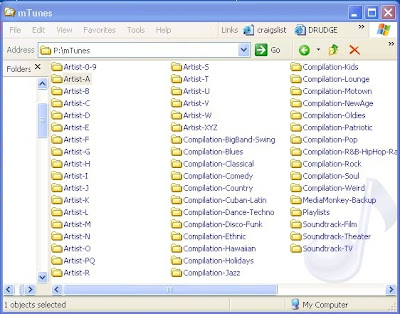
I like your structure. Can you post your syntax please?
Cheers
-
sommo
Re: How do you organize your music?
Ive got mine at this at the mo!
How it works:
Code: Select all
Z:\$if(<Genre>=PodCast,Music Podcast,Music)\$if(<Genre>=PodCast,<album>\,$if(<Type>=MP3,,$if(<Genre>=PodCast,,~CONVERT\<Type>\))<Album Artist>\$if(<Album>,$if(<Album>=Singles,,$if(<Album Artist>=Various,,$if(<Year>,[<Year>])) <Album>),)\$if(<Album>=Singles,,$if(<Track#>,$if(<Disc#>,<Disc#>-,)<Track#:2>,<Artist>) - ))$if(<Genre>=PodCast,<Date> - )<Title>If its an album track (WITH Year, Disk Num, Track Number Set)
Z:\Music\Linkin Park\[2000] Hybrid Theory\1-06 - Runaway.mp3
If its an album track (WIHTOUT Year, Disk Num, Track Number Set)
Z:\Music\Linkin Park\Hybrid Theory\Runaway.mp3
If the album is called 'Singles' it will auto the same as above, but it doesnt matter if the tags are set!
If the song isnt in MP3 format, it will place it into a sub folder called "~CONVERT", with the same rules as above!
If its a podcast (going by the Genre tag), it will place it like
Z:\Music Podcast\Diggnation\2008-11-14 - Sexy Couch Hologram - Diggnation.mp3
Re: How do you organize your music?
Oh, I'm a heathen.
My opinion (no offense):
Screw albums. If you made a crappy album with two good tracks (Rolling Stones) the rest of them are hitting the trashcan.
If Louie Armstrong put the same friggin song on 10 albums, I'm keeping one, only one. Live, alternate take? If it sounds different and it's good OK both can stay, otherwise you're out. But it has to sound different.
Intro's, skits, hidden horrible track cacophonies (Beck) you are gone. Good riddance.
Out of 100,000+ tracks I have kept 32,000. The rest were crap. This took years to whittle down and clean up.
800 ~Acoustic, New Age (4.2GB 62 hours) {yes I mix my stuff together: Ottmar Leibert, Andreas Vollenweider}
2644 ~Blues (11.7GB 163 hours) {Chicago, Electric, Delta, all Blues}
168 ~Classical, Opera (1.1GB 14 hours) {still in progress, besides most opera blows}
764 ~Club (4.7GB 67 hours) {if it dances, it's in here DJ, Industrial, etc.}
193 ~Dark (1.1GB 15 hours) {Bright Eyes to Nine Inch Nails, all most depressing}
977 ~Electronic, Ambient (5.8GB 85 hours) {if it's electronic and it's not rock, it's here: Autechre, Plaid}
1049 ~Folk (4.1GB 58 hours) {Earl Scruggs, Hank Williams Sr., Pete Seeger, Willie Nelson}
194 ~Funk (1.1GB 15 hours) {James Brown, Parliment, Ohio}
152 ~Gangsta Rap (.8GB 10 hours) {nasty "N" word F the police music}
611 ~Hip Hop (3GB 41 hours) {socially acceptable B-Boy and Old School HipHop}
2599 ~Jazz (14.4GB 200 hours) {all traditional and modern jazz: Charlie Parker, Count Basie, Bill Evans}
712 ~Jazz, Acid (4.5GB 61 hours) {jazz mixed with electronics: Jaga Jazzist, Herbie Hancock}
2143 ~Rock, Hard (9.1GB 112 hours) {socially unacceptable: Zao, Blood Brothers, Dwarves}
5506 ~Rock, Medium (25.3GB 346 hours {Iggy Pop, Pixies, Devo, Circle Jerks, The Fall, Sonic Youth}
5563 ~Rock, Light (27.5GB 387 hours) {still a drum beat but not abrasive: Stone Roses, Lou Reed, Sheryl Crow}
4319 ~Soft (20.3GB 289 hours) {softer yet: Annie Lennox, Portishead, Jimmy Buffett, Tori Amos}
526 ~Soma (3.3GB 50 hours) {so boring you fall asleep: Kitaro, Enya, Tuxedo Moon, Sigur Ros}
606 ~Soul (2.7GB 38 hours) {motown: Sam Cooke, Al Greene, Marvin Gaye
112 ~World, African (.5GB 8 hours) {traditional african: Babatunde Olatunji, Ladysmith Black Mambazo}
71 ~World, Cajun (.3GB 4 hours) {Buckwheat Zydeco, Boozoo Chavis}
171 ~World, Celtic (.7GB 11 hours) {Authentic celtic, not new age tripe: Maire Brennan, Duck Baker}
123 ~World, Indian (1.6GB 26 hours) {classical persian to modern: L. Subramaniam to Ravi Shankar}
350 ~World, Latin (1.8GB 25 hours) {cuban to peruvian to mexican: Cesaria Evora, Ruben Blades, Strunz&Farah}
231 ~World, Middle East (1.3GB 23 hours) {afghan, iranian, egyptian:Yair Dalal, Chemiranis, Rabih Abou Khalil}
1390 ~World, Reggae (5.8GB 81 hours) {Bob Marley, Burning Spear, Eek A Mouse, King Tubby}
245 ~World, Various (1.2GB 17 hours) {French, German, etc or worldmix AfroCuban}
204 ~xAvantgarde (1GB 13 hours) {too cool for school: Arthur Brown, Captain Beefheart}
This is also the way my folders are named. But only so friends can pick what genre they want. Otherwise there is NO POINT in folder names at all or in filenames, only in tagging correctly. I don't use rating either (except to cherry-pick for friends). It's either a good track or it's trashed.
Oh, and I always have 3 copies (dedicated music drive and 2 portable backup drives in different locations in case of fire)
My opinion (no offense):
Screw albums. If you made a crappy album with two good tracks (Rolling Stones) the rest of them are hitting the trashcan.
If Louie Armstrong put the same friggin song on 10 albums, I'm keeping one, only one. Live, alternate take? If it sounds different and it's good OK both can stay, otherwise you're out. But it has to sound different.
Intro's, skits, hidden horrible track cacophonies (Beck) you are gone. Good riddance.
Out of 100,000+ tracks I have kept 32,000. The rest were crap. This took years to whittle down and clean up.
800 ~Acoustic, New Age (4.2GB 62 hours) {yes I mix my stuff together: Ottmar Leibert, Andreas Vollenweider}
2644 ~Blues (11.7GB 163 hours) {Chicago, Electric, Delta, all Blues}
168 ~Classical, Opera (1.1GB 14 hours) {still in progress, besides most opera blows}
764 ~Club (4.7GB 67 hours) {if it dances, it's in here DJ, Industrial, etc.}
193 ~Dark (1.1GB 15 hours) {Bright Eyes to Nine Inch Nails, all most depressing}
977 ~Electronic, Ambient (5.8GB 85 hours) {if it's electronic and it's not rock, it's here: Autechre, Plaid}
1049 ~Folk (4.1GB 58 hours) {Earl Scruggs, Hank Williams Sr., Pete Seeger, Willie Nelson}
194 ~Funk (1.1GB 15 hours) {James Brown, Parliment, Ohio}
152 ~Gangsta Rap (.8GB 10 hours) {nasty "N" word F the police music}
611 ~Hip Hop (3GB 41 hours) {socially acceptable B-Boy and Old School HipHop}
2599 ~Jazz (14.4GB 200 hours) {all traditional and modern jazz: Charlie Parker, Count Basie, Bill Evans}
712 ~Jazz, Acid (4.5GB 61 hours) {jazz mixed with electronics: Jaga Jazzist, Herbie Hancock}
2143 ~Rock, Hard (9.1GB 112 hours) {socially unacceptable: Zao, Blood Brothers, Dwarves}
5506 ~Rock, Medium (25.3GB 346 hours {Iggy Pop, Pixies, Devo, Circle Jerks, The Fall, Sonic Youth}
5563 ~Rock, Light (27.5GB 387 hours) {still a drum beat but not abrasive: Stone Roses, Lou Reed, Sheryl Crow}
4319 ~Soft (20.3GB 289 hours) {softer yet: Annie Lennox, Portishead, Jimmy Buffett, Tori Amos}
526 ~Soma (3.3GB 50 hours) {so boring you fall asleep: Kitaro, Enya, Tuxedo Moon, Sigur Ros}
606 ~Soul (2.7GB 38 hours) {motown: Sam Cooke, Al Greene, Marvin Gaye
112 ~World, African (.5GB 8 hours) {traditional african: Babatunde Olatunji, Ladysmith Black Mambazo}
71 ~World, Cajun (.3GB 4 hours) {Buckwheat Zydeco, Boozoo Chavis}
171 ~World, Celtic (.7GB 11 hours) {Authentic celtic, not new age tripe: Maire Brennan, Duck Baker}
123 ~World, Indian (1.6GB 26 hours) {classical persian to modern: L. Subramaniam to Ravi Shankar}
350 ~World, Latin (1.8GB 25 hours) {cuban to peruvian to mexican: Cesaria Evora, Ruben Blades, Strunz&Farah}
231 ~World, Middle East (1.3GB 23 hours) {afghan, iranian, egyptian:Yair Dalal, Chemiranis, Rabih Abou Khalil}
1390 ~World, Reggae (5.8GB 81 hours) {Bob Marley, Burning Spear, Eek A Mouse, King Tubby}
245 ~World, Various (1.2GB 17 hours) {French, German, etc or worldmix AfroCuban}
204 ~xAvantgarde (1GB 13 hours) {too cool for school: Arthur Brown, Captain Beefheart}
This is also the way my folders are named. But only so friends can pick what genre they want. Otherwise there is NO POINT in folder names at all or in filenames, only in tagging correctly. I don't use rating either (except to cherry-pick for friends). It's either a good track or it's trashed.
Oh, and I always have 3 copies (dedicated music drive and 2 portable backup drives in different locations in case of fire)
-
Solitaire001
- Posts: 77
- Joined: Tue May 05, 2009 7:33 pm
Re: How do you organize your music?
I organize my files in a very basic manner:
/ Album Artist / Album / [Track Names]
The reason I use the Album Artist instead of the Artist is that when I'm tagging tracks I use Artist to show the individual/individuals/act who performed on each specific song. I use the Album Artist to list the individual/act for the entire album (using "Various Artists" for true compilations).
As far as organizing my music, one thing I've started doing is ensuring that every track has a unique name. As my music collection has grown, I've found that I have many tracks which have the same name (due to different versions of the same song by different artists, or different songs with the same name). Now, when two or more songs have the same name, I put a number in brackets after the song title (example: "End Of The World [1]" by Skeeter Davis, and "End Of The World [2]" by Pet Shop Boys, two different songs with the same name). This make it easier to locate a specific song.
As far as custom fields go, I've renamed the first one "Music." It is a yes/no field that indicates which tracks are music. The reason I needed this field is so that I can have a playlist which only contains music tracks. Although the genre field is useful, there are many tracks that fall outside of the genres associated with music. For example, I have many comedy tracks that are comedy songs, but the genre also includes comedy bits that are not music. With the Music field, it is possible to have a playlist which only features music.
/ Album Artist / Album / [Track Names]
The reason I use the Album Artist instead of the Artist is that when I'm tagging tracks I use Artist to show the individual/individuals/act who performed on each specific song. I use the Album Artist to list the individual/act for the entire album (using "Various Artists" for true compilations).
As far as organizing my music, one thing I've started doing is ensuring that every track has a unique name. As my music collection has grown, I've found that I have many tracks which have the same name (due to different versions of the same song by different artists, or different songs with the same name). Now, when two or more songs have the same name, I put a number in brackets after the song title (example: "End Of The World [1]" by Skeeter Davis, and "End Of The World [2]" by Pet Shop Boys, two different songs with the same name). This make it easier to locate a specific song.
As far as custom fields go, I've renamed the first one "Music." It is a yes/no field that indicates which tracks are music. The reason I needed this field is so that I can have a playlist which only contains music tracks. Although the genre field is useful, there are many tracks that fall outside of the genres associated with music. For example, I have many comedy tracks that are comedy songs, but the genre also includes comedy bits that are not music. With the Music field, it is possible to have a playlist which only features music.