
I'm seeing sync oddities.
Win 11 MMW 2024.1.0.3113
MMA 2.0.5.1248
-First there were 900+ files with 1 star I never attributed; only in MMA. Those files never synced those ratings to MMW.
-AutoPlaylist in MMA for 1 star keeps files there regardless of removal of star after sync. Files with 1 star removed automatically were removed from that AutoPlaylist in MMW.
I have latest versions of everything.
MMW:
I've deselected Library/When adding files to library/Only for files with changed timestamp
MMA:
Library & Sync/check for new/changed media.
I just added a new MMW file with 1 star and MMA DID UPDATE.
However, it didn't update when the star was removed.
Buggy.
Help please! Thanks!
sync issues MMA & MMW
Moderator: Gurus
Re: sync issues MMA & MMW
I'm also having sync issues. Using Windows 10, fully updated, MMW 2024.01.0.3113 and MMA 2.0.5.1248.
I checked to have playlists synced from MMW to MMA, along with a few new albums, and specifically unchecked audiobooks. Instead it failed to sync any of the new playlists, did sync the albums and then tried to sync audiobooks but failed, saying it was trying to convert one (they are all mp3s on MMW but I didn't want them synced anyway)
What's going on? I wish it was like it used to be, just drag and drop the files you wanted from MMW to MMA.
I checked to have playlists synced from MMW to MMA, along with a few new albums, and specifically unchecked audiobooks. Instead it failed to sync any of the new playlists, did sync the albums and then tried to sync audiobooks but failed, saying it was trying to convert one (they are all mp3s on MMW but I didn't want them synced anyway)
What's going on? I wish it was like it used to be, just drag and drop the files you wanted from MMW to MMA.
Re: sync issues MMA & MMW
Replying to my own post from last fall. I still cannot get it to sync correctly. I admit I do not understand a lot of the technical aspects of MMW. From reading the directions, I have MMW showing connection with MMA on my phone. I go under Sync List; Library to device and choose some albums. Go to phone and hit Sync Now. Instead of the albums I've chosen, it starts downloading a bunch of audiobooks that I did NOT choose and in fact I have gone through MMW and removed them all from the database. Where is it getting this? It analyzes and says there are over 3000 files to download but I've only selected about 6 albums, so maybe 60-75 files.
I used to be able to connect by USB and drag and drop what i wanted. My phone does not allow me to control it by the laptop when they are connected that way now, only controlled by phone. But even when I choose the albums from the phone, instead it keeps trying to sync these non-existent audiobooks. Same when connecting by wifi.
I hope someone can please help me.
I used to be able to connect by USB and drag and drop what i wanted. My phone does not allow me to control it by the laptop when they are connected that way now, only controlled by phone. But even when I choose the albums from the phone, instead it keeps trying to sync these non-existent audiobooks. Same when connecting by wifi.
I hope someone can please help me.
Re: sync issues MMA & MMW
Check in MMW in the Device Profile as to what is selected to be Synced, this can be easier than checking this in MMA.
Selections are inclusive, so if anywhere the Audiobook files are included in the selection they'll be synced.
If the Audiobook files are no longer in MMW, are you sure Sync is not trying to Sync them from MMA > MMW?
Selections are inclusive, so if anywhere the Audiobook files are included in the selection they'll be synced.
If the Audiobook files are no longer in MMW, are you sure Sync is not trying to Sync them from MMA > MMW?
Download MediaMonkey ♪ License ♪ Knowledge Base ♪ MediaMonkey for Windows 2024 Help ♪ MediaMonkey for Android Help
Lowlander (MediaMonkey user since 2003)
Lowlander (MediaMonkey user since 2003)
Re: sync issues MMA & MMW
Thank you for trying to help.
Under the device profile for the phone storage, at the top it says "sync list Library to Device" and under it on the left only Music is partly checked. On the right, under music I've selected a few albums. There are no audiobooks included. Yet when I press sync now on the phone, it analyzes over 3000 files and then begins downloading audiobooks which are no longer even in my database!
I have systematically gone through both MMW and MMA and deleted all audiobooks and podcasts. My settings for scanning my hard drive for media files is set only to my music file but only scanned when I direct it, not all the time.
After deleting all the audiobooks in MMW I closed both it and MMA, rebooted both computer and phone and tried again. Still happening.
MMA is version 2.1.1.1290 (Samsung A53, have tried syncing both to sd card and internal storage with no difference)
MMW is 2024.2.0.3184 running on Windows 11 with latest updates.
Under the device profile for the phone storage, at the top it says "sync list Library to Device" and under it on the left only Music is partly checked. On the right, under music I've selected a few albums. There are no audiobooks included. Yet when I press sync now on the phone, it analyzes over 3000 files and then begins downloading audiobooks which are no longer even in my database!
I have systematically gone through both MMW and MMA and deleted all audiobooks and podcasts. My settings for scanning my hard drive for media files is set only to my music file but only scanned when I direct it, not all the time.
After deleting all the audiobooks in MMW I closed both it and MMA, rebooted both computer and phone and tried again. Still happening.
MMA is version 2.1.1.1290 (Samsung A53, have tried syncing both to sd card and internal storage with no difference)
MMW is 2024.2.0.3184 running on Windows 11 with latest updates.
Re: sync issues MMA & MMW
Any Playlists selected to be Synced? MediaMonkey can only Sync to the phone what's in the MMW Library, and only Syncs what's selected.
Do you maybe have a different device profile (ie. you edited the wrong one in MMW), or do you have other instances of MMW (on same or other PCs) that is being used for Sync.
A screenshot of the Sync list may help.
Do you maybe have a different device profile (ie. you edited the wrong one in MMW), or do you have other instances of MMW (on same or other PCs) that is being used for Sync.
A screenshot of the Sync list may help.
Download MediaMonkey ♪ License ♪ Knowledge Base ♪ MediaMonkey for Windows 2024 Help ♪ MediaMonkey for Android Help
Lowlander (MediaMonkey user since 2003)
Lowlander (MediaMonkey user since 2003)
Re: sync issues MMA & MMW
No, I have deselected playlists and everything else except music and then checked only a few albums. I have taken a screen shot of both the sync list on MMW and the screen on my phone showing what it is downloading. The file it is downloading onto the phone is no longer even in the MMW database, nor on my phone.
Is there a cache I need to clear, that is holding information from previous syncs?
https://photos.fife.usercontent.google. ... authuser=0
https://photos.fife.usercontent.google. ... authuser=0
Is there a cache I need to clear, that is holding information from previous syncs?
https://photos.fife.usercontent.google. ... authuser=0
https://photos.fife.usercontent.google. ... authuser=0
Re: sync issues MMA & MMW
We can't see the screenshots.
It's likely the file is selected by one of the selections, but you can capture the Sync in a debug log (step 4b) and attach the log to a Support Ticket: https://www.mediamonkey.com/forum/viewtopic.php?t=86643
Please also mention some specific files that are Synced unexpectedly.
It's likely the file is selected by one of the selections, but you can capture the Sync in a debug log (step 4b) and attach the log to a Support Ticket: https://www.mediamonkey.com/forum/viewtopic.php?t=86643
Please also mention some specific files that are Synced unexpectedly.
Download MediaMonkey ♪ License ♪ Knowledge Base ♪ MediaMonkey for Windows 2024 Help ♪ MediaMonkey for Android Help
Lowlander (MediaMonkey user since 2003)
Lowlander (MediaMonkey user since 2003)
Re: sync issues MMA & MMW
Hmm, my screenshots are on google photos. I followed the directions in your link for posting screenshots but when I copy the url into the (img) brackets as indicated, nothing shows up when I post it. It said sometimes just putting the url without the brackets work so I did that. I will see if I can figure out another way to post those.
I'm downloading the debug version right now and will repeat everything to get a log.
I'm downloading the debug version right now and will repeat everything to get a log.
Re: sync issues MMA & MMW
Hotlinking is likely not allowed, only few services (like the ones mentioned) allow for this.
Download MediaMonkey ♪ License ♪ Knowledge Base ♪ MediaMonkey for Windows 2024 Help ♪ MediaMonkey for Android Help
Lowlander (MediaMonkey user since 2003)
Lowlander (MediaMonkey user since 2003)
Re: sync issues MMA & MMW
Here are the screenshots from the last sync attempt
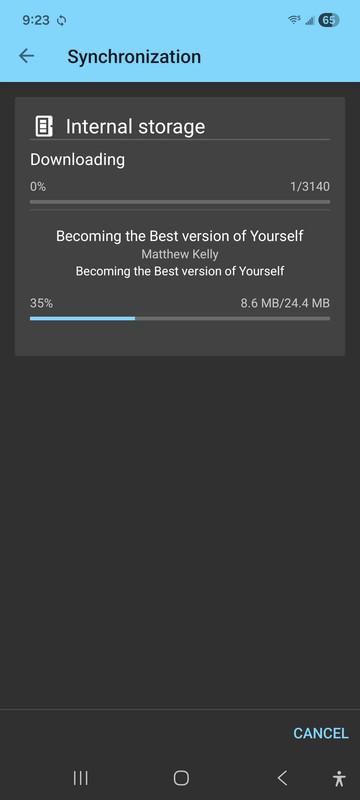
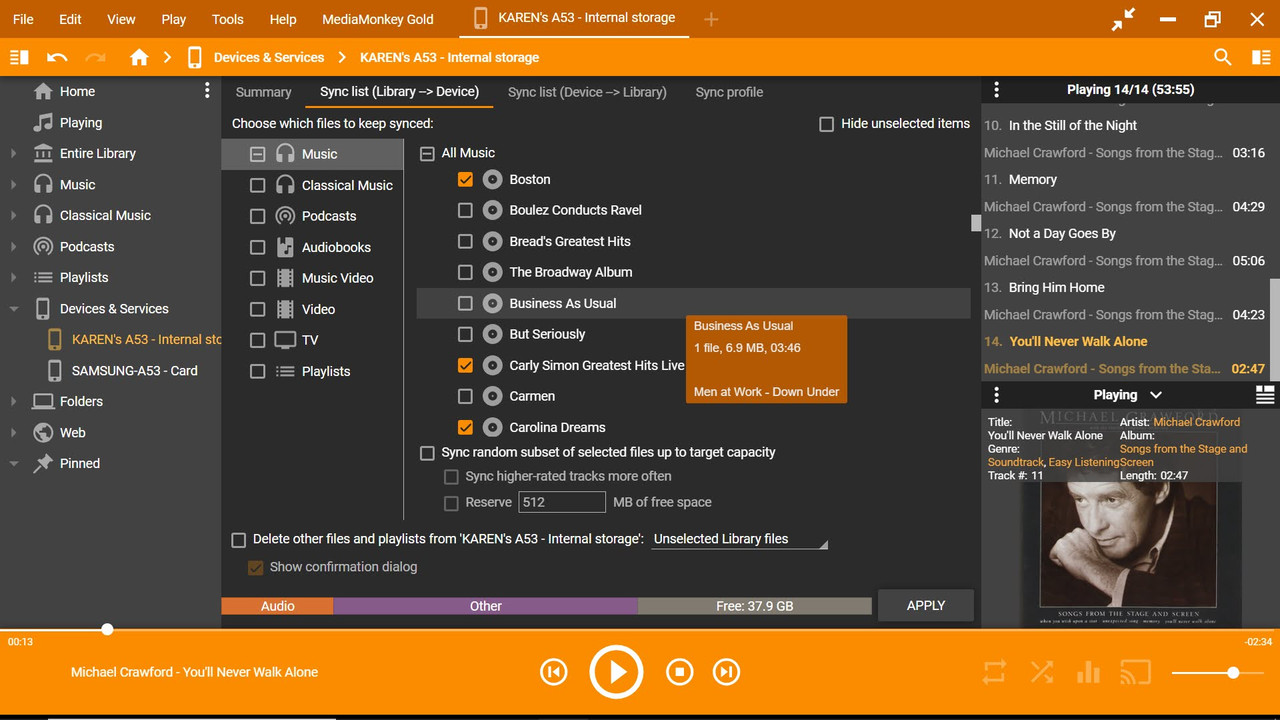
Re: sync issues MMA & MMW
After downloading the MMW debug program and repeating the sync attempt (this time I only checked a single album), it synced a much smaller list but still WAY more than I'd checked. In fact, I think it synced what i was trying to sync earlier this week, about 8-10 albums. But the sync list has only the one album checked, both on the MMW and on MMA.
I've sent the debug report although it kept giving me errors. It did appear to send, after requesting more info.
I think MMW is holding the "old" sync list in spite of checking different files, so earlier this week it was using the last time I synced (I don't remember when that was or what I synced but those files would have been consistent) and now after installing the debug form, it's only remembering the sync list I made earlier this week, not what I put in just now.
Thank you for helping with this. I appreciate the links to step by step info I needed.
I've sent the debug report although it kept giving me errors. It did appear to send, after requesting more info.
I think MMW is holding the "old" sync list in spite of checking different files, so earlier this week it was using the last time I synced (I don't remember when that was or what I synced but those files would have been consistent) and now after installing the debug form, it's only remembering the sync list I made earlier this week, not what I put in just now.
Thank you for helping with this. I appreciate the links to step by step info I needed.
Re: sync issues MMA & MMW
As the screenshot of the selection only shows a partial list it's not possible to tell if what's Syncing is or isn't selected to be Synced. The specific Album could be selected higher in the list or via a different sub-node in Music. Nothing else seems to be selected, so that's good.
You could try unselect everything (you do need to select things again later for a proper Sync), then select only 1 Album and Sync again.
You're not set to delete any files of the device on Sync. This means files already on the device will remain there even when not selected to be Synced.
There also could be a small chance that the Device Profiles between Card and Internal Storage are swapped (ie. you're editing the Internal Storage device profile in MMW, but Sync uses the Card device profile instead).
You could try unselect everything (you do need to select things again later for a proper Sync), then select only 1 Album and Sync again.
You're not set to delete any files of the device on Sync. This means files already on the device will remain there even when not selected to be Synced.
There also could be a small chance that the Device Profiles between Card and Internal Storage are swapped (ie. you're editing the Internal Storage device profile in MMW, but Sync uses the Card device profile instead).
Download MediaMonkey ♪ License ♪ Knowledge Base ♪ MediaMonkey for Windows 2024 Help ♪ MediaMonkey for Android Help
Lowlander (MediaMonkey user since 2003)
Lowlander (MediaMonkey user since 2003)
Re: sync issues MMA & MMW
That's what I did this morning, deselected everything and then selected only the one album Boston. But it synced over 100-ish files, which is what I had originally selected the other day but was then getting 3000 files (I canceled that each time)
If you look at the screen shot showing the title it was downloading, Matthew Kelly Becoming the Best Version of Yourself, I don't even have that file in the database anymore in MMW. Yet it is obviously downloading it , along with 3000 other files not selected, many of which also are no longer in the database. i have not deleted these from my hard drive b/c I do want to keep them long-term but I don't have MMW set to scan and add files except when I specify it, so where is it getting it?
I hope the debug log can shed some light on this. I don't mind deleting and re-installing MMA but really don't want to have to do that with MMW if at all possible.
If you look at the screen shot showing the title it was downloading, Matthew Kelly Becoming the Best Version of Yourself, I don't even have that file in the database anymore in MMW. Yet it is obviously downloading it , along with 3000 other files not selected, many of which also are no longer in the database. i have not deleted these from my hard drive b/c I do want to keep them long-term but I don't have MMW set to scan and add files except when I specify it, so where is it getting it?
I hope the debug log can shed some light on this. I don't mind deleting and re-installing MMA but really don't want to have to do that with MMW if at all possible.
Re: sync issues MMA & MMW
The only reasons I can think of for this are:
- File(s) are still in the MMW Library (Entire Library can be used to confirm) AND;
- A different Device Profile is used by Sync (where the file(s) are still selected for Sync) OR;
- You have a different instance of MediaMonkey running and are Syncing with that instance instead
Hopefully the log shows what the issue is.
- File(s) are still in the MMW Library (Entire Library can be used to confirm) AND;
- A different Device Profile is used by Sync (where the file(s) are still selected for Sync) OR;
- You have a different instance of MediaMonkey running and are Syncing with that instance instead
Hopefully the log shows what the issue is.
Download MediaMonkey ♪ License ♪ Knowledge Base ♪ MediaMonkey for Windows 2024 Help ♪ MediaMonkey for Android Help
Lowlander (MediaMonkey user since 2003)
Lowlander (MediaMonkey user since 2003)