Expanding menu items do not expand outside app frame [#22269]
Moderator: Gurus
 Expanding menu items do not expand outside app frame [#22269]
Hi. Expanding menus do not display beyond the limits of the MMM window, thereby masking elements as they aren't adapting to the window constraint or displaying visibly outside that constraint.
Re: Expanding menu items do not expand outside app frame
Hi.
Can you send me a debug.log from Public/MediaMonkey5 folder with any repro steps please ?
Regards, Petr.
Can you send me a debug.log from Public/MediaMonkey5 folder with any repro steps please ?
Regards, Petr.
How to make a debuglog in Windows - step 4b: https://www.mediamonkey.com/forum/viewt ... 30&t=86643
How to make a debuglog in MacOS - https://www.mediamonkey.com/forum/viewt ... p?t=109505
How to make a debuglog in MacOS - https://www.mediamonkey.com/forum/viewt ... p?t=109505
Re: Expanding menu items do not expand outside app frame
Macbook Model = 14" Apple M3 Pro chip with 18gb memory
Mac OS = Tahoe 26.5.2
MediaMonkey version = 2027.0.0.3516 (2026-08-01)
I have experienced the same issue on the latest build whereby expanding menus do not fit within the MMM window. Below are examples...
This shows me changing the 'Genre' value of a file, which is situated on the right hand side of the window, and as you can see the expanding menu appears way over to the left of the 'Genre' field...
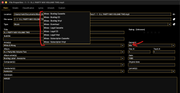
This is changing the same 'Genre' value in the Windows version of MM. The expanding menu appears directly under the 'Genre' field...
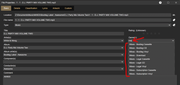
The problem occurs when I try and change one of the values that are situated on the left hand side of the window. In this case I am trying to change the 'Artist' field, and as you can see the expanding menu appears outside of the MMM window so I can't see the values displayed...
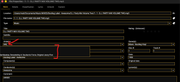
I have created and sent you a debug log after trying to update the 'Artist' field as shown above and it is LogID 73BB31A1. Let me know if you need any more information.
Thanks
Matt
Mac OS = Tahoe 26.5.2
MediaMonkey version = 2027.0.0.3516 (2026-08-01)
I have experienced the same issue on the latest build whereby expanding menus do not fit within the MMM window. Below are examples...
This shows me changing the 'Genre' value of a file, which is situated on the right hand side of the window, and as you can see the expanding menu appears way over to the left of the 'Genre' field...
This is changing the same 'Genre' value in the Windows version of MM. The expanding menu appears directly under the 'Genre' field...
The problem occurs when I try and change one of the values that are situated on the left hand side of the window. In this case I am trying to change the 'Artist' field, and as you can see the expanding menu appears outside of the MMM window so I can't see the values displayed...
I have created and sent you a debug log after trying to update the 'Artist' field as shown above and it is LogID 73BB31A1. Let me know if you need any more information.
Thanks
Matt
Re: Expanding menu items do not expand outside app frame
How to make a debuglog in Windows - step 4b: https://www.mediamonkey.com/forum/viewt ... 30&t=86643
How to make a debuglog in MacOS - https://www.mediamonkey.com/forum/viewt ... p?t=109505
How to make a debuglog in MacOS - https://www.mediamonkey.com/forum/viewt ... p?t=109505